
Model & Plan Architecture: Map Search Demand to Floor Plans and Inventory
Last Updated: December 26, 2025 • 12 min read
📌 Key Takeaways
Floor plan pages convert to booked tours when hierarchy, templates, and internal linking route buyers to the right page at the right moment.
- Architecture Is Routing Logic: Plan pages function as decision-routing systems that move buyers from search intent to scheduled tours, not static brochures for browsing.
- Hierarchy Mirrors Buyer Thinking: A clean Community → Plan → Inventory structure matches how buyers search and prevents duplicate content from fragmenting SEO authority.
- Templates Standardize Conversion Paths: Every plan page needs core attribute fields, availability context, and above-the-fold CTAs to answer "Does this fit?" and "Where can it be built?"
- Canonical Governance Prevents Clutter: Stable Plan IDs, consistent naming, and redirect policies protect URL equity when plans rename, communities close, or inventory sells.
- Internal Links Complete the Handoff: Cross-linking between communities, plans, and inventory ensures buyers never hit dead ends and tracking attributes tours back to originating pages.
Clean architecture turns search visibility into predictable tour volume.
Marketing directors and web teams at homebuilders will gain an implementation-ready framework here, preparing them for the 30-day rollout checklist that follows.
The buyer types "4-bedroom new construction [City]" into their phone. They tap the first result, landing on an unfiltered list of every floor plan you have ever built—no availability data, no clear next step. They bounce, and the potential tour booking is lost.
This happens dozens of times a day on builder websites where plan and inventory pages lack clear structure. The search demand exists. The intent is real. But the architecture fails to route buyers to the right page at the right moment.
Think of it like a site superintendent coordinating trades. Even with strong materials and skilled crews, outcomes suffer when sequencing and handoffs are unclear. A plan page is not a brochure—it is routing logic that moves buyers from "interest" to "scheduled."
This guide provides a scalable information architecture and template governance model that maps buyer search demand to plan pages and inventory, prioritizing conversion paths that drive scheduled tours. If your plan pages aren't driving tours—and market factors like pricing and location are aligned—the digital fix usually comes down to three things: hierarchy, templates, and linking rules.
Why Floor Plan Search Demand Gets Lost on Builder Websites
Buyers searching for floor plans use specific, attribute-rich queries. They search for bedroom counts, square footage ranges, specific features like first-floor primary suites, and community names combined with "new construction" or "homes for sale." A buyer might type "primary suite downstairs [Community Name]" or "4 bedroom new homes [City]"—these searches represent high-intent moments where buyers are actively narrowing their options.
Yet most builder websites fail to capture this demand effectively.
Common failure modes include:
- Generic landings where all plans appear on a single page without meaningful filtering or context
- Thin plan pages containing only a rendering and a name, lacking the attribute data buyers searched for and missing the "where can I build this?" answer
- Duplicate variants where the same plan appears under multiple URLs across different communities without proper canonicalization
- Faceted index bloat where filter combinations create hundreds of indexable URLs that dilute authority and confuse search engines
These failures matter because they disconnect visibility from outcomes. A site can rank for plan-related searches yet fail to convert that traffic into booked tours. Visibility is potential; booked tours are the proof. When tracking focuses on sessions and rankings alone rather than tour bookings and design-center appointments, these architectural problems remain hidden until sales teams notice the pipeline thinning.
From a tours-first perspective, this is not merely a "rankings problem." It is a routing problem: high-intent visitors arrive, but the site does not reliably route them to a tour-ready page that answers availability and next steps.
The Clean Hierarchy: Community → Plan → Inventory
Effective plan architecture establishes a clear parent-child relationship: communities contain plans, and plans connect to specific inventory homes. This hierarchy mirrors how buyers think and search.
Defining the canonical plan entity is the first decision. A canonical plan page serves as the single authoritative source for that floor plan's information—square footage, bedrooms, bathrooms, features, and media. This page exists independently of any specific community and carries the plan's core SEO equity.
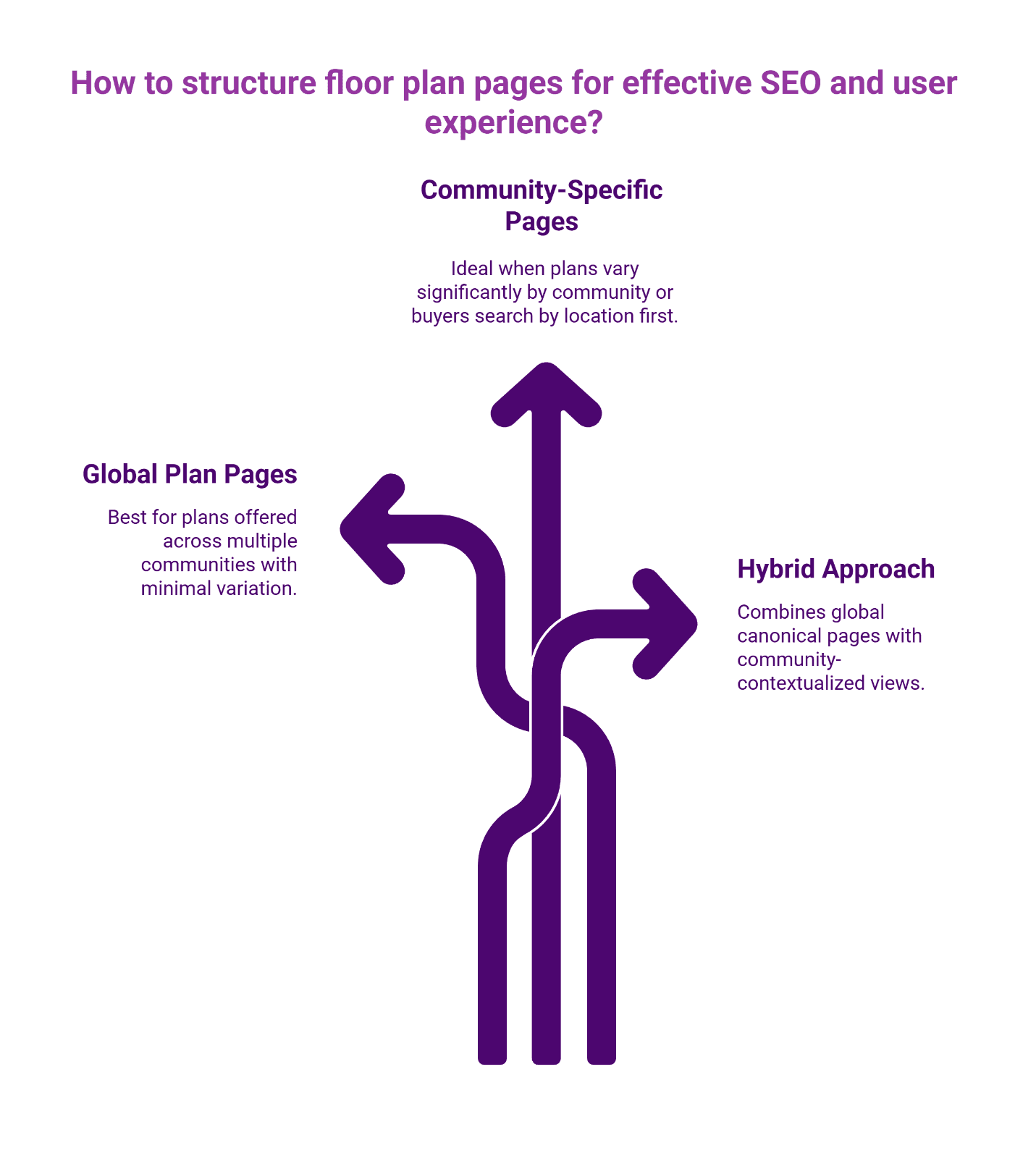
The choice between global plan pages versus community-specific plan pages depends on how your organization operates:
Global plan pages work well when the same plan is offered across multiple communities with minimal variation. The canonical plan page ranks for general plan searches, while community pages link to it for context.
Community-specific plan pages make sense when plans vary significantly by community or when buyers primarily search by location first, plan second.
Most builders benefit from a hybrid approach: maintain canonical plan entities at the global level while creating community-contextualized views that inherit core data but add location-specific availability and pricing context.
Either approach can work. The key is consistency: each plan needs a clear canonical definition, and each inventory item must point back to that plan entity without duplicating content.
Plan Template Spec: Your Field Dictionary for Search Demand
This specification serves as an engineering-ready field dictionary for plan page templates. It provides the foundational structure for on-page optimization that connects search demand to your floor plan content.
Canonical Plan Entity Rules
The canonical plan entity is the stable representation of a floor plan independent of community and inventory churn.
- Plan ID (required): Internal identifier that never changes—this anchors URL stability even when marketing names shift
- Plan Name (required): Display name; may change, but must not drive URL structure
- Canonical URL (required): Stable slug based on a durable rule (see URL governance below)
- Variants (optional): Elevations and option bundles must be governed to avoid index clutter
Core Fields Required
Every plan page needs these fields populated to match basic buyer searches:
- Plan Name: The canonical, stable name used across all marketing
- Bedrooms: Numeric value (enable filtering and search matching)
- Bathrooms: Full and half bath counts
- Square Footage: Living area, with optional garage and outdoor living breakouts
- Stories: Single, two-story, or specific configurations
- Garage: Capacity and configuration (2-car attached, 3-car tandem, etc.)
High-Intent Feature Fields Recommended
These fields capture the long-tail searches that indicate buyers further along in their decision process:
- Primary Suite Location: First floor, second floor, or split
- Study/Home Office: Presence and location
- Outdoor Living: Covered patio, extended patio, outdoor kitchen options
- Flex Spaces: Bonus rooms, lofts, media rooms
- Special Features: Multi-gen suites, wine rooms, elevator-ready
- Structural Highlights: Features like vaulted ceilings—include only if consistently defined across communities to avoid confusion and duplicate variants
Context Fields for Routing
These fields connect plans to availability and enable proper buyer routing:
- Community Availability: Which communities currently offer this plan
- Base Price Range: By community (if pricing is displayed)
- Available Inventory: Quick move-in homes using this plan
- Model Home Status: Whether a model exists and where
Cross-Link Rules
Proper internal linking ensures buyers can navigate the hierarchy:
- Every plan page links to each community where the plan is available
- Every community page links to all plans offered there
- Every inventory home links back to its parent plan
- Plans link to available quick move-in inventory using that floor plan
Governance Rules
Maintain architectural integrity with these standards:
- Naming: Use consistent plan names across all channels (website, MLS, print)
- Canonicalization: Set canonical tags pointing to the primary plan URL; community-specific views can use canonical pointing to either global or community version based on your strategy
- Redirects: When plans are renamed or retired, implement 301 redirects to the most relevant active page
For technical implementation of canonicalization, Google's documentation on consolidating duplicate URLs provides authoritative guidance.
Schema Recommendation
For plan and inventory pages, consider structured data only if there is an approved internal standard. Structured data is implementation-dependent. While Schema.org defines specific vocabulary for FloorPlan, you should prioritize Product or RealEstateListing types where supported, as these align more closely with current Google rich result eligibility. Follow Google's structured data guidance and Schema.org vocabulary when implementing.
Match Search Demand to Plan Attributes
Buyers at the top of the funnel rarely search for "Plan A," though repeat visitors might. More often, they search for attributes and fit. A plan template that captures these attributes clearly helps long-tail plan searches resolve to the correct plan page rather than a generic index.
The practical mapping principle: treat beds, baths, square footage, stories, and garage as the baseline "spec sheet" language buyers expect. Use high-intent feature fields only when definitions are consistent across communities. Use context fields—availability, communities, quick move-ins—to convert interest into action.
Search routing improves when plan pages answer two questions without forcing visitors to navigate filters: "Does this fit?" and "Where can it be built?"
Build a Plan Page Template That Converts to Tours
Template standardization ensures every plan page contains the modules buyers need to take action. This aligns with building scalable content architecture that serves both search engines and buyers.
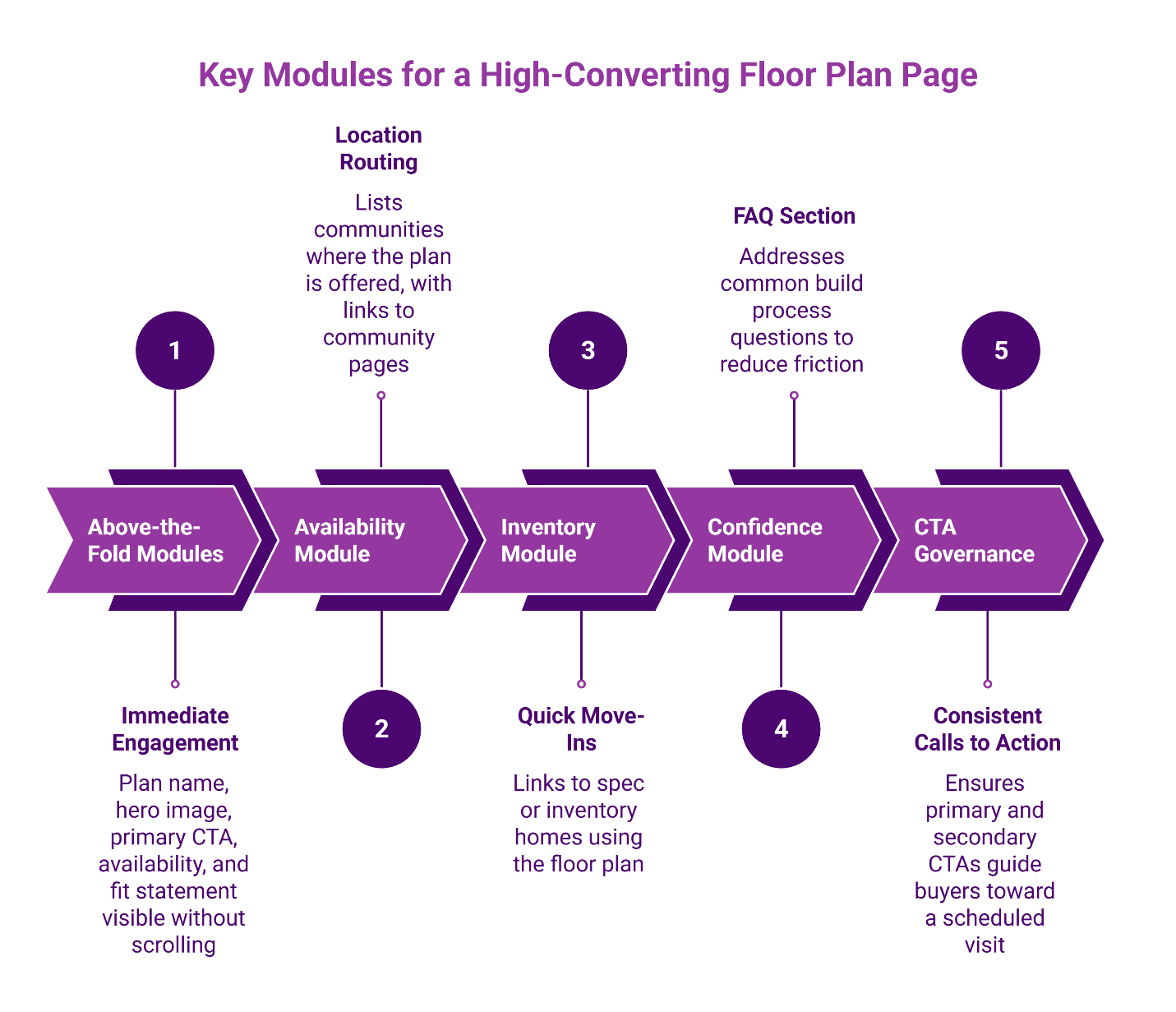
Above-the-Fold Modules
These elements should reduce friction immediately:
- Plan name and key attributes (beds/baths/sq ft) visible without scrolling
- Hero image or rendering
- Primary CTA: "Schedule a Tour" or "Book an Appointment"
- Community availability indicator
- Short "fit" statement explaining who this plan serves—this helps buyers self-qualify quickly
Availability Module
This section answers "Where can I build this plan?" List communities where the plan is currently offered, with links to each community page. For buyers who found the plan first, this routing is essential.
Inventory Module
This section answers "Are there quick move-ins using this plan?" Link directly to any spec or inventory homes using this floor plan. Buyers often prefer move-in ready over a build timeline, and this module captures that intent.
Confidence Module
Include FAQs that reduce friction around the build process: timeline expectations, what can vary by lot or community, and how to take the next step. This module addresses common hesitations before they become objections.
CTA Governance
Maintain consistency across all plan pages:
- Primary CTA focuses on tour booking or design-center appointments
- Secondary CTAs can offer brochure downloads or saved searches
- Every plan page should enable a clear next step toward a scheduled visit
Connect Inventory Without Duplicating Content
Inventory pages—individual homes available for purchase—present a canonicalization challenge. Each inventory home uses a specific plan but exists at a specific address with unique features and pricing.
What inventory pages should inherit from their parent plan:
- Base floor plan description and specifications
- Standard features and included items
- Media showing the base plan layout
What must be unique to each inventory page:
- Specific address and lot information
- Actual pricing (not base pricing)
- Completion timeline or move-in date
- Lot-specific features or upgrades included
- Photos of the actual home if construction is complete
Canonicalization approach: Inventory pages should generally be self-canonical rather than pointing to the plan page, since they represent distinct purchasable products. However, implement proper internal linking so the plan page links to all available inventory and each inventory page links back to learn more about the underlying plan.
Facet governance prevents filter combinations from creating SEO clutter. When buyers filter plans by bedrooms, price range, and community, these filtered views typically should not be indexable. Use robots directives or parameter handling to prevent search engines from crawling and indexing every possible filter combination.
Variant governance matters: elevations and option bundles can be valuable for buyers, but they often create near-duplicate pages. A common practice is to keep variants visible within the canonical plan page experience while preventing each variant from becoming an indexable page unless it has distinct value and governance.
Naming, URLs, and Change Management
Plan names change. Communities rename. Inventory sells. Without governance rules, these normal business events create broken links, duplicate content, and lost SEO equity.
Stable URL slugs use the plan's canonical name and avoid date-based or system-generated identifiers. A URL like /plans/the-magnolia/ remains stable even if the CMS assigns different internal IDs over time.
Redirect policy for common scenarios:
- Plan renamed: 301 redirect from old URL to new URL
- Plan retired: 301 redirect to the most similar active plan, or to the plans listing page
- Community closed: 301 redirect community-specific plan URLs to the canonical plan page
- Inventory sold: Redirect to the parent plan page or a "similar homes" landing
Variant governance handles elevations and option packages. If elevation choices significantly change the home's appearance and buyers search for them specifically, consider creating distinct pages. Otherwise, handle elevations as options within the single plan page to avoid fragmenting authority.
Internal Linking Rules That Route Buyers to the Right Next Step
Strategic internal linking connects the architecture and guides buyers through their journey. These patterns align with tracking what matters—ensuring that visibility leads to measurable tour outcomes.
Community-to-plan linking patterns:
- Community pages feature a "Floor Plans" or "Our Plans" section
- Each plan listed links to either the community-specific plan view or the canonical plan page
- Consider featuring 2-3 "most popular" plans prominently
Plan-to-inventory linking patterns:
- Plan pages include an "Available Homes" module
- Each inventory listing links to the full inventory detail page
- When inventory sells, remove the link but maintain the plan page structure
Measurement hand-off basics: Use consistent UTM parameters on tour booking links to attribute conversions back to the originating plan or community page. This connects the sales and marketing alignment needed to prove SEO impact on actual tour volume.
For community-level discovery context, see Local SEO for Luxury Home Communities.
Implementation Checklist: Your First 30 Days
Implementing plan architecture improvements works best in phases. This 30-day roadmap approach balances quick wins with sustainable change.
Week 1: Audit current plan and inventory architecture. Inventory all existing plan pages, identify duplicates, map the current hierarchy (or lack thereof), and document URL patterns currently in use.
Week 2: Define templates and governance. Finalize your field dictionary, design the plan page template modules, establish naming conventions, and document redirect policies.
Week 3: Pilot 1–2 communities. Implement the new architecture for a limited set of communities. Test the template, verify internal links work correctly, and confirm tracking captures tour bookings.
Week 4: Measurement and rollout. Establish baseline metrics for the pilot communities, refine based on initial results, and create the rollout plan for remaining communities.
Frequently Asked Questions
Our Editorial Process: Our expert team uses AI tools to help organize and structure our initial drafts. Every piece is then extensively rewritten, fact-checked, and enriched with first-hand insights and experiences by expert humans on our Insights Team to ensure accuracy and clarity.
About the Brazos Valley Marketing Insights Team: The Brazos Valley Marketing Insights Team is our dedicated engine for synthesizing complex topics into clear, helpful guides. While our content is thoroughly reviewed for clarity and accuracy, it is for informational purposes and should not replace professional advice.

About the Author
Dustin Ogle
Dustin Ogle is the Founder and Head of Strategy at Brazos Valley Marketing. With over 9 years of experience as an SEO agency founder, he specializes in developing the advanced AI-driven strategies required to succeed in the new era of search.