Community Page Templates That Convert: Essential Elements for Tour-Ready Local SEO
Last Updated: January 18, 2026 • 12 min read
📌 Key Takeaways
Tour-ready community pages convert local search visibility into scheduled model center appointments by removing every obstacle between the search and the booking.
- Bridge the ROBO Gap: Homebuyers research online, then book offline—your community page must make that transition effortless.
- Route Intent Like Trades: Geo searches land on community pages, plan searches on model pages, and brand searches on navigation pages.
- Module Ownership Prevents Chaos: Assign clear accountability for each section—Marketing owns copy, Web owns technical, Sales Ops owns booking flow.
- Five-Second Confirmation Test: Location, hours, and the primary "Book a Tour" action must be visible before scrolling on mobile.
- Governance Beats One-Time Fixes: Treat inventory accuracy and performance checks as repeatable processes, not launch tasks.
Wrong landing pages waste local visibility—right structure captures it.
Marketing managers, web developers, and sales operations teams at homebuilding companies will gain a reusable template and QA checklist here, preparing them for the module-by-module implementation guide that follows.
A tour-ready community page is a location-specific landing page engineered to convert geo-intent searches into scheduled model center appointments. Unlike generic builder pages that collect inquiries, this page answers a specific local question—"new homes near [Neighborhood]"—and removes every obstacle between the search and a booked tour.
Many homebuyers follow a ROBO path: they research online, then book offline. Your community page must bridge that gap. Think of it like intersection signage on a construction site. The sign doesn't just announce the project exists; it tells drivers exactly where to turn, when the model center is open, and what they'll find when they arrive. Your community page does the same job for the buyer who searched "[ZIP code] new construction homes" on a Saturday morning.
A tour-ready community page must include:
- Community name with clear location context ([City], [Neighborhood])
- Local-specific CTA: "Book a Tour at [Community]"—not generic "Contact Us"
- Model center details: address, hours, directions, appointment options
- Inventory or availability module showing what's ready now
- Plans overview with scannable attributes (beds, baths, square footage)
- Amenities and neighborhood fit (schools, commute, lifestyle alignment)
- Proof signals: review excerpts and trust indicators
- FAQ module addressing common objections
- Internal links routing visitors to the right next step
Here is the wireframe and checklist you can reuse across every community in your portfolio.
The Conversion Problem: Local Visibility That Lands on the Wrong Page
The search often happens during peak leisure hours, such as a Saturday morning. A buyer types "[Neighborhood] new homes" and lands on... your brand homepage. Or worse, a generic "Communities" index with twelve cards and no clear next step.
The result is typically an increase in form fills labeled "general inquiry" rather than scheduled tours. While marketing reports may show traffic is up, the sales calendar often remains deceptively empty.
This is the gap between visibility and conversion. Geo-modified searches carry high intent—these buyers already know the area they want. When they land on a page that doesn't immediately confirm location, availability, and how to see the homes, they bounce. The tour that should have been booked becomes a lost opportunity buried in a CRM note.
A community page is your digital model center—build it to schedule tours.
Primary Actionable Asset: Tour-Ready Community Page Wireframe
Copy this structure into your CMS template. Assign owners. QA every community page against it.
Wireframe: Tour-Ready Community Page
Section A: Above the Fold. This is what the visitor sees before scrolling. Include the community name with clear location context ([City] / [Neighborhood]), a trust line ("From [Builder] • [Neighborhood] • Open Sat-Sun 10AM-5PM"), your primary CTA ("Book a Tour at [Community]"), and a secondary CTA ("Get Directions to Model Center"). Everything a buyer needs to confirm they're in the right place and take action should be visible in under five seconds.
Section B: Decision Support. Immediately below the fold, provide the information buyers need to evaluate the community. This includes an inventory or availability module ("12 homes available now"), a plans overview with scannable attributes (beds, baths, square footage, key features), and an amenities and neighborhood section covering schools, commute options, and lifestyle fit.
Section C: Proof. Build trust with review excerpts (two to three lines, attributed to the source) and a photo or video gallery with descriptive captions that highlight what buyers care about—finish quality, community amenities, and neighborhood context.
Section D: Conversion and Routing. Close with a clear path to action. Include a tour booking module (calendar embed, form, or phone option), a directions button with map, an FAQ module addressing six to eight common questions, and cross-links to related pages (plans, inventory, neighborhood guides) so visitors can self-route to their next step.
What you can do with this
- Copy the module structure into your CMS template
- Assign owners per module (Marketing owns copy; Web owns technical; Sales Ops owns booking flow)
- QA every community page against the checklist before launch
QA Checklist (page-by-page)
- Primary "Book a Tour at [Community]" action is visible without scrolling on mobile
- Address and hours are present, consistent, and clickable for directions
- Availability and plan summaries are current (or clearly labeled if "coming soon")
- Copy is unique enough to avoid identical openings across multiple community pages
- Photos and captions describe what buyers evaluate (finish level, lifestyle, neighborhood cues)
- Internal links route geo-intent to the community page and plan-intent to plan pages
- Structured data reflects what is visible on-page and is technically valid per Google's guidelines
- Performance is checked using PageSpeed Insights, especially for images and heavy scripts above the fold
The Essential Modules: What to Include, What to Omit, and Where Each Belongs
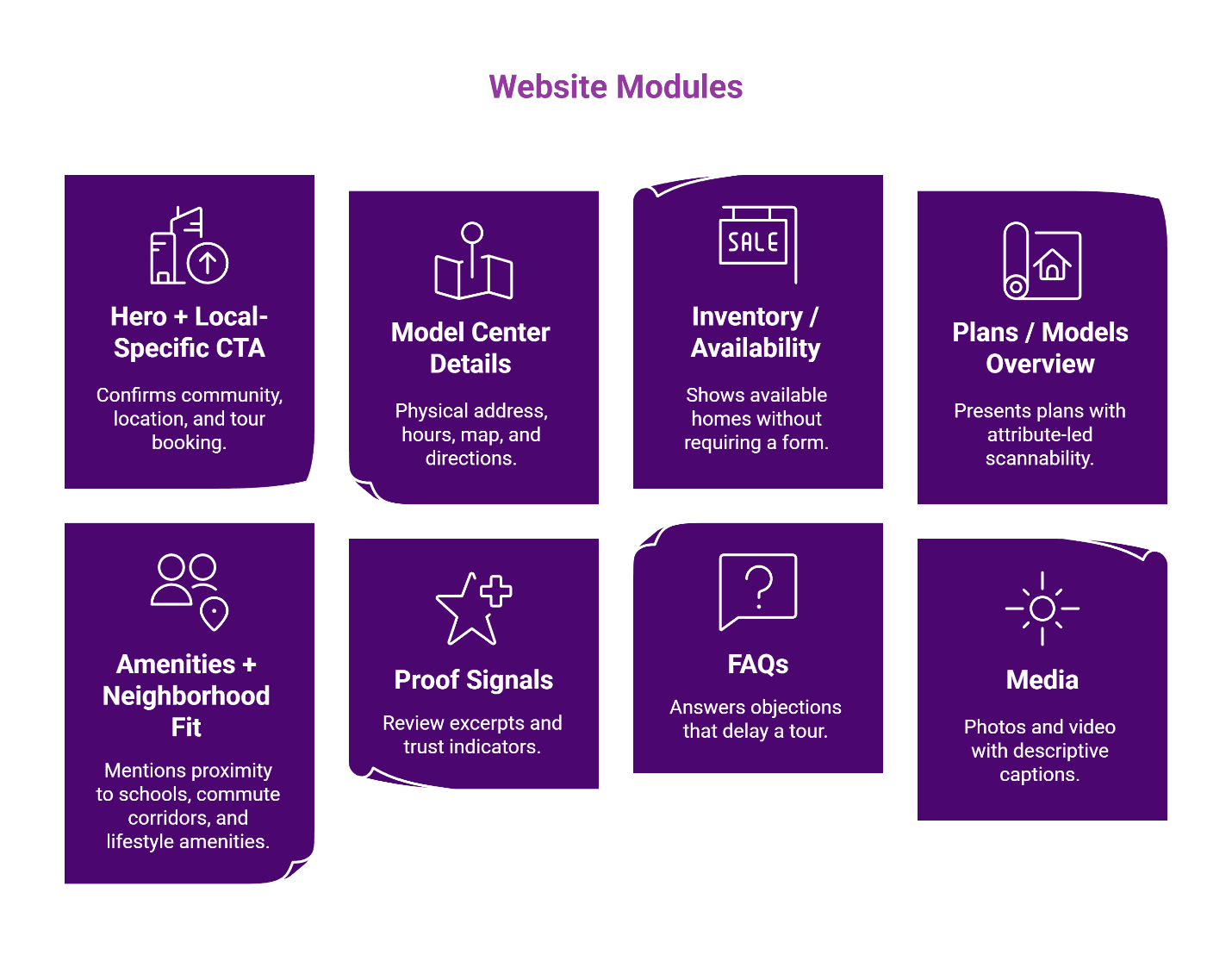
Module 1: Hero + Local-Specific CTA
The hero must confirm three things in under five seconds: this is [Community], it's in [Neighborhood/City], and here's how to see it in person.
Use "Book a Tour at [Community]"—never "Contact Us" or "Learn More." Generic CTAs create generic inquiries. Local-specific CTAs create appointments.
Owner: Marketing (copy), Web (implementation)
Module 2: Model Center Details
Include the physical address, open hours, a map embed, and a directions button. Clarify whether tours are appointment-only or walk-in welcome.
This isn't optional decoration. Buyers searching "[ZIP] model homes open today" need this information to act. Google's guidance on improving local ranking emphasizes that accurate business information and profile completeness are practical levers for local visibility.
Owner: Sales Ops (hours accuracy), Web (map integration)
Module 3: Inventory / Availability
Show what's available without forcing a form submission first. "12 quick move-in homes" or "3 homesites remaining" reduces friction and qualifies intent.
If inventory changes weekly, treat it as a governance issue: define who updates it and how often. Stale availability data erodes trust.
Owner: Sales Ops (data), Web (feed integration)
Module 4: Plans / Models Overview
Present plans with attribute-led scannability: beds, baths, square footage, key features. Link each plan to its detail page.
Avoid paragraph descriptions here. Buyers scan; give them the specs first.
Owner: Marketing (content), Web (layout)
Module 5: Amenities + Neighborhood Fit
Write for geo intent. Mention proximity to schools, commute corridors, and lifestyle amenities the target buyer cares about. This is where "near [Neighborhood]" language belongs—naturally, not stuffed.
Owner: Marketing
Module 6: Proof Signals
Place review excerpts and trust indicators (awards, ratings) in the proof section. Select excerpts that mention specific community or model center experiences.
Owner: Marketing (selection), Web (display)
Module 7: FAQs
Answer the objections that delay a tour: pricing transparency, appointment flexibility, what to expect during a visit. This module also captures PAA queries.
Owner: Marketing (content), Sales (objection input)
Module 8: Media
Use photos and video with captions that describe what the buyer cares about: "Chef's kitchen in the Maple plan" or "Community pool and clubhouse." Captions are indexable content—make them work.
Owner: Marketing
Internal Linking Rules: Route Intent Like a Site Superintendent Routes Trades
A site superintendent doesn't send the electrician to the framing station. Your internal links should route visitors with the same precision.
Three routing rules
- Geo-intent → Community page. Searches like "[Neighborhood] new homes" land here.
- Plan-intent → Plan/model page. Searches like "[Builder] 4 bedroom plans" go to the plan detail page.
- Brand-intent → Brand/nav page. Searches for your builder name go to the homepage or About page.
Prevent cannibalization by keeping brand pages navigational and community pages conversion-focused. Use consistent anchor text patterns that match the intent you're routing. For a deeper framework, see local SEO for luxury home communities and neighborhood content clusters.
Structured Data and Technical Essentials
Keep it simple. Keep it consistent across every community page.
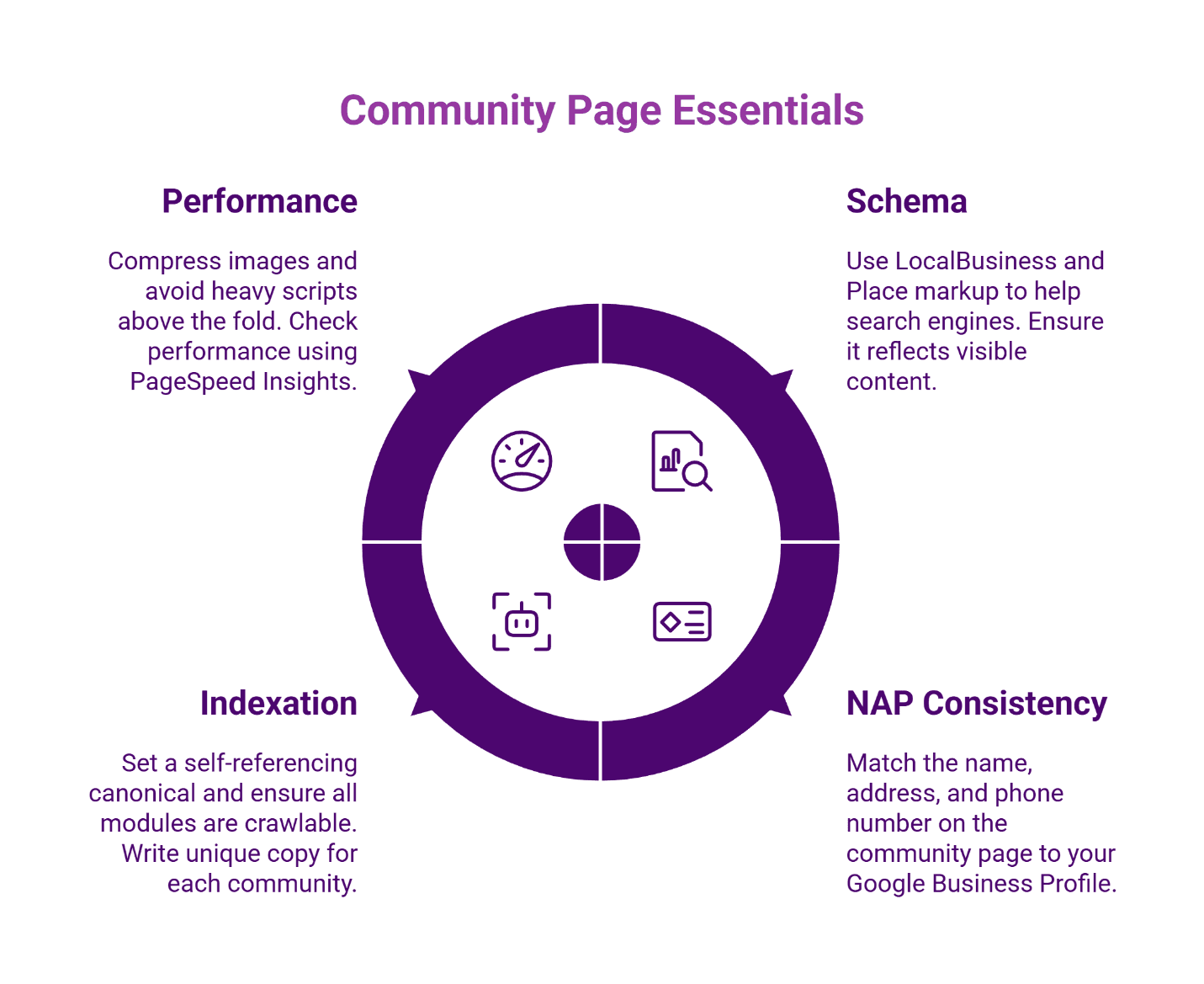
Schema recommendation: Structured data helps search engines interpret business details, but Google frames structured data as enabling features rather than guaranteeing them, and it must reflect visible content. Use LocalBusiness to communicate your model center as a visitable location. Add Place markup to reinforce the geographic context. Results can vary by query, device, and eligibility criteria. For detailed profile optimization, see map pack mastery for model centers.
NAP consistency: The name, address, and phone number on the community page must match your Google Business Profile and all citations exactly.
Indexation basics: Set a self-referencing canonical. Ensure all modules are crawlable (no JavaScript-only content for critical information). Write unique copy per community—don't duplicate descriptions across pages.
Performance: Compress images. Avoid heavy scripts above the fold. A slow community page risks losing the buyer who searched on mobile—check performance using PageSpeed Insights.
Tour-First Measurement: What to Track From This Page
Visibility is potential; booked tours are the proof.
Primary conversions:
- Booked tours / scheduled appointments
- Calendar submissions from the page
Leading indicators (operational signals, not end goals):
- Direction clicks
- Click-to-call events
- CTA button clicks
Attribution hygiene: Apply consistent UTM conventions to every CTA and profile link so you can trace which community pages drive which tours. For a measurement framework, see tracking what matters in local SEO.
Resources
FAQ: Community Page Templates for Local SEO
Your Next 7-Day Implementation Plan
Day 1-2: Audit existing community pages against the wireframe. Note missing modules.
Day 3-4: Apply the template to one pilot community. Assign module owners.
Day 5: QA the pilot page—CTAs, links, schema, NAP consistency.
Day 6: Validate internal linking and routing rules.
Day 7: Baseline measurement setup (tour-first events, UTM conventions).
Roll out to remaining communities on a weekly cadence.
Ready to build community pages that convert local visibility into scheduled tours? Schedule your free strategy session.
Our Editorial Process: Our expert team uses AI tools to help organize and structure our initial drafts. Every piece is then extensively rewritten, fact-checked, and enriched with first-hand insights and experiences by expert humans on our Insights Team to ensure accuracy and clarity.
About the Brazos Valley Marketing Insights Team: The Brazos Valley Marketing Insights Team is our dedicated engine for synthesizing complex topics into clear, helpful guides. While our content is thoroughly reviewed for clarity and accuracy, it is for informational purposes and should not replace professional advice.

About the Author
Dustin Ogle
Dustin Ogle is the Founder and Head of Strategy at Brazos Valley Marketing. With over 9 years of experience as an SEO agency founder, he specializes in developing the advanced AI-driven strategies required to succeed in the new era of search.