Community Launch SEO Timeline: Align Content, Technical, and Local Tracks to Release Dates
Last Updated: December 22, 2025 • 12 min read
📌 Key Takeaways
A community launch SEO timeline coordinates content, technical, and local tracks in parallel—like trades on a job site—so pages are indexed, profiles are verified, and tours are bookable by opening day.
- Lock Naming at Week -8: Finalizing community and model names eight weeks out ensures printed brochures, signage, and digital assets all align before production deadlines hit.
- Treat Verification as a Gate, Not a Task: Google now frequently mandates video verification or live calls, so starting at Week -3 provides critical buffer for stricter identity checks and potential manual reviews.
- Use Correct Schema for Real Estate: RealEstateListing, SingleFamilyResidence, or Product schema (for priced floor plans) are the appropriate structured data types—HowTo schema is reserved for instructional content and risks penalties.
- Measure Leading Indicators First: Rankings, impressions, and direction requests are the necessary antecedents that predict booked tours; tracking them weekly surfaces problems before launch day.
- Run Readiness Gates Like Inspections: T-14 and launch-day checklists with clear owners and evidence requirements prevent "almost ready" from becoming "not discoverable."
Run SEO like a superintendent runs a job site: parallel tracks, clear gates, non-negotiable deadlines.
Marketing directors and digital leads at luxury homebuilders will find a copy-ready timeline and checklist structure here, preparing them for the week-by-week implementation guide that follows.
The model center opens in six weeks. The community page doesn't exist yet. The Google Business Profile still shows a placeholder address from the land acquisition phase. Meanwhile, your sales team is printing brochures and scheduling walkthroughs.
This gap between physical readiness and digital visibility is where launches quietly fail.
A schedule-aware SEO plan coordinates content, technical, and local tracks so a new community is indexed, discoverable, and tour-ready by release day. Think of it like running a job site: a superintendent doesn't wait until drywall is up to call the electrician. Trades run in parallel, inspections happen at gates, and nothing ships until every punch list item clears. The same logic applies here.
When a buyer searches "luxury new homes in [City]" or "new construction near [Neighborhood]" two weeks before your model opens, they should land on a tour-ready community page with accurate map details, current photography, and a clear booking CTA. This article delivers a three-track timeline to make that happen—measured not just by rankings or sessions, but ultimately by booked tours and design-center appointments.
What Launch-Ready SEO Means for a Community (and What It's Not)
Launch-Ready Equals Indexed, Discoverable, and Tour-Ready
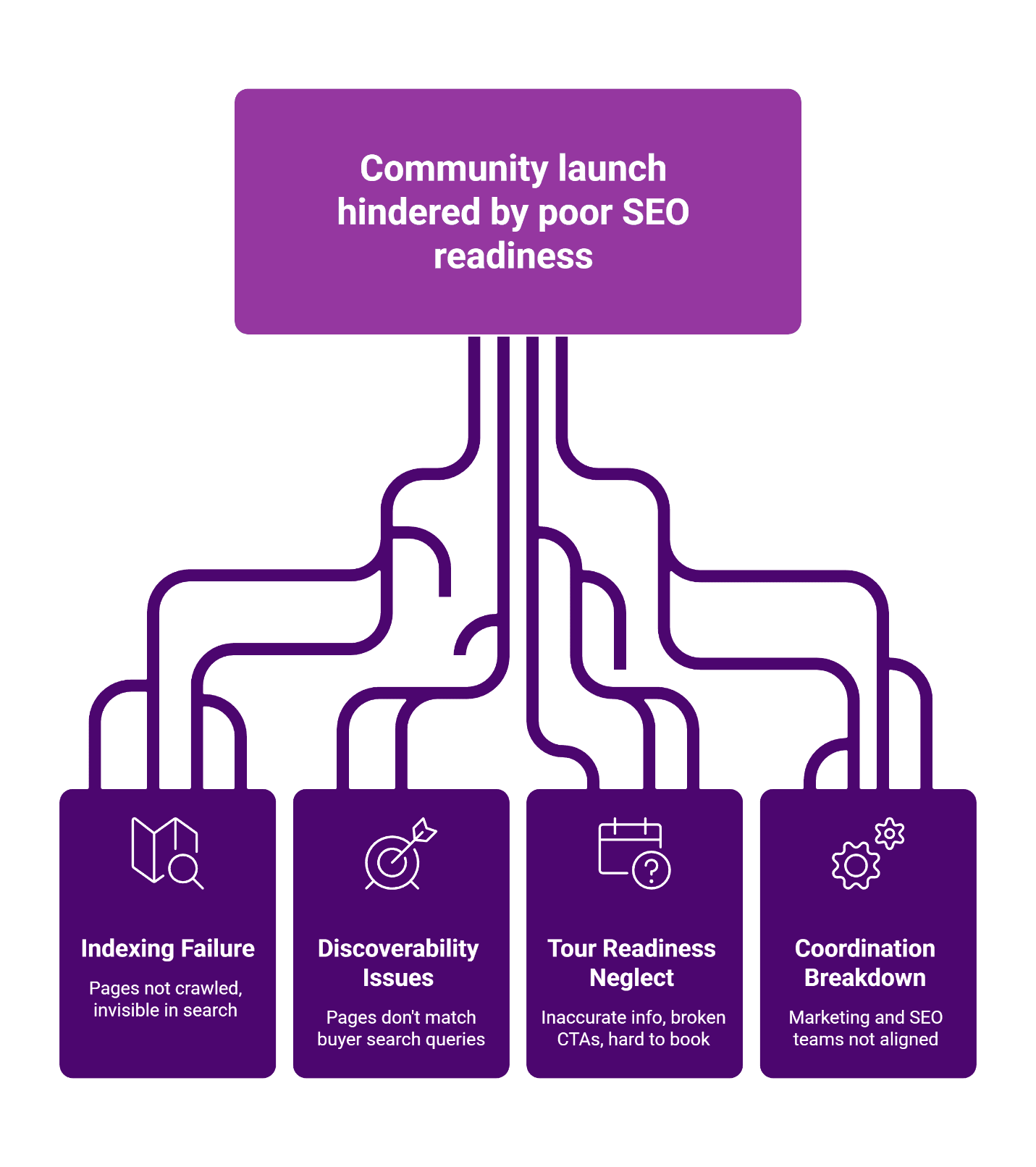
Launch-ready SEO requires three conditions to be true on opening day. First, your community and model pages are indexed—Google has crawled them, and they appear in search results. Second, those pages are discoverable for the queries buyers actually use: community names, "[City] new homes," "[Neighborhood] luxury builder." Third, every page is tour-ready: accurate addresses, working CTAs, and a frictionless path to schedule a visit.
This is different from "SEO complete." Rankings fluctuate. Organic traffic builds over months. But launch-ready visibility—being findable and bookable on day one—is a binary pass/fail checkpoint.
Common Failure Modes When SEO Is Treated Like a Last-Minute Checklist
The most common failure pattern looks like this: marketing finishes the community page two days before the grand opening. The page goes live but isn't submitted to Google. The location profile still shows "Temporarily Closed" or uses a sales office address twenty miles away. The booking CTA links to a generic contact form instead of a tour scheduler.
These aren't SEO problems in the traditional sense. They're coordination failures—the digital equivalent of showing up to a final inspection with the HVAC system still in boxes. A tour-first local SEO approach treats visibility as a milestone on the project schedule, not an afterthought.
"Visibility is potential; booked tours are the proof."
Inputs You Need Before the Clock Starts
Milestones to Capture
Before building the timeline, identify every public-facing milestone: teaser launch, pre-sale opening, model center completion, grand opening, and any community events. Each milestone represents a potential search moment—a date when buyers might look for information and expect to find something current and accurate.
Asset Inventory
Gather the raw materials your SEO work depends on:
- Community name, tagline, and positioning language
- Floor plans with square footage, bedroom/bath counts, and base pricing tiers (if public)
- Amenity descriptions and lifestyle messaging
- Site maps, community maps, and driving directions
- Photography (renderings early, progress photos mid-build, finished shots at completion)
- Model center address, hours, and contact information
Owners and Approval SLAs
Assign clear owners for each track. Marketing typically owns content. IT or your web team owns technical implementation. Sales or onsite staff own location profile accuracy. Establish approval windows—48 hours for copy review, 24 hours for photo approval—so the timeline doesn't slip waiting for sign-offs.
The Community Launch SEO Timeline
The following timeline coordinates three parallel tracks. Like trades on a job site, these workstreams run simultaneously with dependencies and handoffs at specific gates.
| Week | Content Track | Technical Track | Local Track | Deliverable | Done When |
|---|---|---|---|---|---|
| -8 | Finalize naming conventions and URL structure | Confirm CMS access and staging environment | Identify NAP (name, address, phone) details | Naming governance document | All stakeholders approve naming and URL patterns |
| -5 | Draft community page copy and CTAs | Set up page templates and internal linking plan | Reserve location profile (do not publish) | Community page in staging | Copy approved, template functional |
| -4 | Create model/plan page templates | Implement schema markup blocks | Prepare citation list and photo assets | Model pages in staging, schema validated | Schema testing tool shows no errors |
| -3 | Finalize all page content | Submit XML sitemap, request indexing | Create/verify location profile, seed Q&A | Pages indexed or pending, profile live | Google Search Console shows pages discovered |
| -2 | QA all pages, CTAs, and tracking | Verify analytics and UTM parameters | Complete citation submissions, add photos | QA checklist complete | All items green on readiness gate |
| -1 to 0 | Publish, monitor, respond | Submit final URLs for crawling | Monitor profile for accuracy, respond to engagement | Launch complete | Community appears in search, tours bookable |
| +1 to +2 | Expand neighborhood content | Fix any indexing issues | Capture first reviews, expand Q&A | Post-launch sprint initiated | Review velocity on track, no indexing errors |
For a broader view of how these tracks fit into a full SEO program, explore our SEO solutions.
Week-by-Week Quick Reference
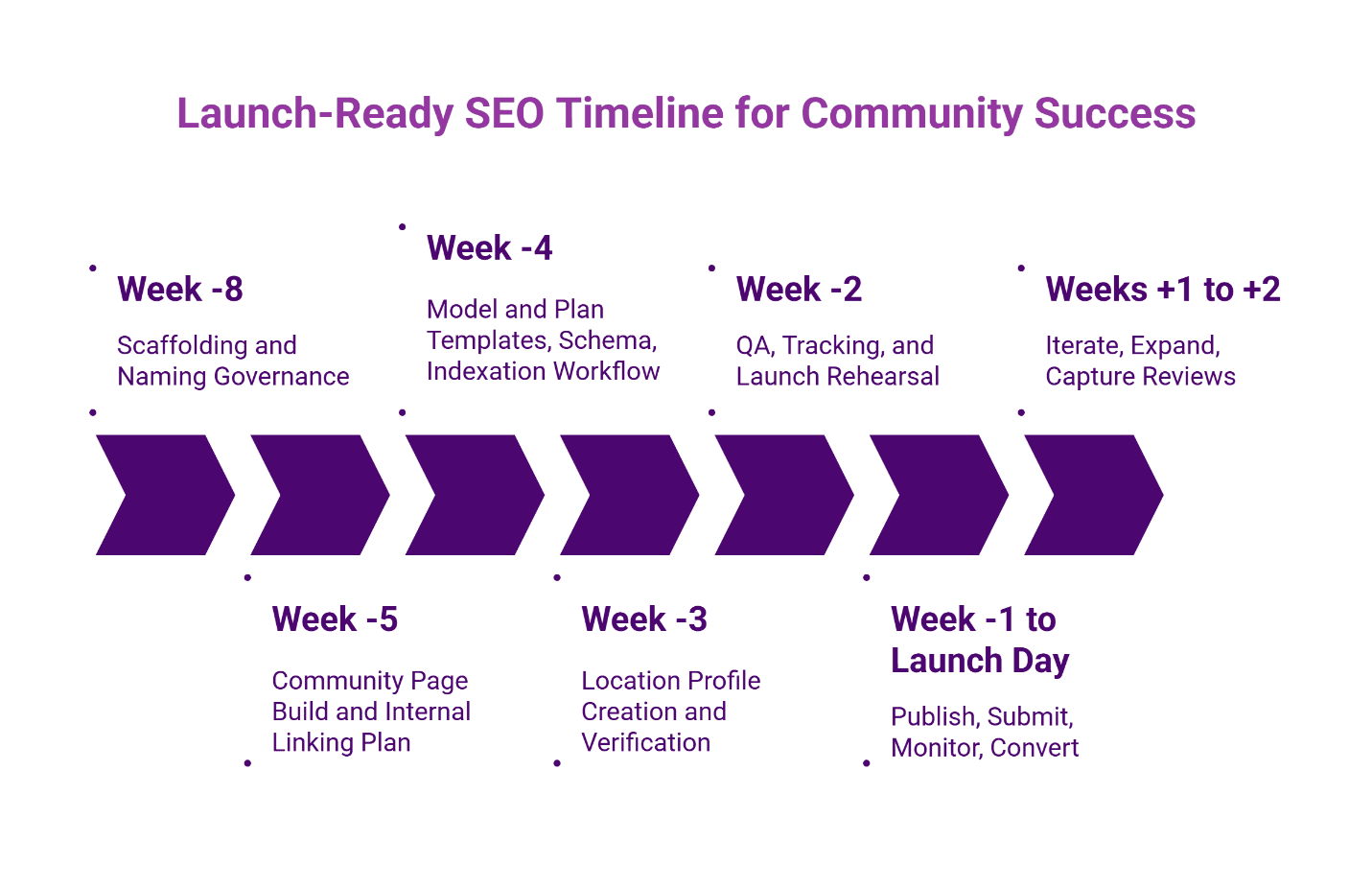
- Week -8: Governance — Lock naming, owners, and approvals so edits do not stall and printed materials remain accurate.
- Week -5: Community page build — Structure the page so local intent and booking paths are visible.
- Week -4: Plans and models — Publish scaffolding early so long-tail demand can land somewhere useful.
- Week -3: Local activation — Verify the profile and populate it with accurate fields and photos.
- Week -2: QA and tracking — Rehearse launch like an inspection: crawlability, tracking, conversion paths.
- Week -1 to launch: Publish and monitor — Finalize content, request indexing updates if needed, and watch conversion signals.
- Week +1 to +2: Expand and tighten — Add supporting content and address friction points.
Week -8: Scaffolding and Naming Governance
Establish the URL structure and naming conventions that will govern every page. Decide whether communities live at /communities/[name]/ or /new-homes/[city]/[name]/. Lock down how model names, plan names, and elevations will be labeled. This governance prevents the confusion that leads to duplicate pages and keyword cannibalization later—and ensures printed brochures, signage, and digital assets all reflect the same naming from day one.
Week -5: Community Page Build and Internal Linking Plan
Build the community page in staging with placeholder content where final copy isn't ready. Map internal links: which hub pages will link to this community? Which existing neighborhood or city pages should reference it? Internal linking signals to search engines that this new page belongs within your site's architecture. For guidance on map pack mastery for model centers, ensure each model center has a distinct page that the community page links to.
Week -4: Model and Plan Templates, Schema, Indexation Workflow
Create reusable templates for model homes and floor plans. Implement structured data using RealEstateListing, SingleFamilyResidence, or Product schema (for specifically priced floor plans) where appropriate. Prepare your indexation workflow: know how you'll submit sitemaps and request crawling through Google Search Console.
Week -3: Location Profile Creation and Verification
Create or claim your Google Business Profile following Google's guidelines for representing your business. Use the exact NAP that matches your community page. Upload photos, set hours, and seed the Q&A section with common buyer questions. Verification now frequently mandates video recording or live video calls, though physical postcards remain a secondary option typically arriving within 14 days. Starting at Week -3 is critical to accommodate these stricter identity checks and potential manual reviews.
Week -2: QA, Tracking, and Launch Rehearsal
Run through every page as if you were a buyer. Click every CTA. Confirm UTM parameters fire correctly. Check that the location profile shows the right address and links to the right page. This is your punch list walk—identify issues now, not on launch day.
Week -1 to Launch Day: Publish, Submit, Monitor, Convert
Push pages live. Request indexing for priority URLs. Monitor Search Console for crawl errors. Watch your location profile for the first direction requests and calls. Respond to any early engagement promptly.
Weeks +1 to +2: Iterate, Expand, Capture Reviews
With launch behind you, shift to expansion. Add neighborhood content clusters. Begin the review generation process outlined in reviews and reputation for luxury communities. Fix any indexing issues that surfaced during launch week.
Readiness Gates: Green, Yellow, Red Checklists
T-14 Days Gate: Indexing and Local Readiness
| Requirement | Owner | Evidence of Completion |
|---|---|---|
| Community page indexed or submitted | Web/Marketing | URL appears in Search Console |
| Location profile verified | Marketing/Sales | Verification badge visible |
| NAP consistent across page and profile | Marketing | Manual audit complete |
| Schema markup validated | Web | No errors in testing tool |
| Internal links in place | Marketing | Link audit spreadsheet |
Launch Day Gate: Tour Conversion Readiness
| Requirement | Owner | Evidence of Completion |
|---|---|---|
| Booking CTA functional | Marketing | Test submission received |
| UTM parameters firing | Marketing/Analytics | UTM visible in analytics |
| Location profile hours accurate | Sales/Onsite | Visual confirmation |
| Photography current | Marketing | No placeholder images |
| Sales team aware of digital leads | Sales | Confirmation from sales manager |
Tour-First Measurement Setup
UTM Conventions for Profiles and CTAs
Standardize UTM parameters so every touchpoint is traceable. A logical convention:
- utm_source: google, bing, gbp (for Google Business Profile)
- utm_medium: organic, local, cpc
- utm_campaign: community name or launch identifier
- utm_content: specific CTA or profile link
For example, a "Book a Tour" button on the community page might use ?utm_source=google&utm_medium=organic&utm_campaign=oakwood-estates&utm_content=book-tour-cta.
KPI Ladder: Leading to Lagging Indicators
Not all metrics matter equally. Leading indicators predict outcomes; lagging indicators confirm them. For deeper guidance on tracking what matters in local SEO, structure your reporting around this ladder:
- Leading indicators (visibility): impressions, map pack appearances, direction requests, profile views.
- Engagement indicators (intent): page visits, time on page, CTA clicks, profile calls.
- Lagging indicators (conversion): booked tours, design-center appointments, attributed sales.
Weekly Reporting Cadence and Owners
Establish a weekly cadence where marketing reports on visibility and engagement metrics, and sales confirms tour volume and quality. This sales–marketing alignment for tours ensures that success isn't just traffic—it's tours that show up.
Common Launch Blockers and Fast Fixes
Address or Map Details Not Final. If the final address isn't available, use the nearest intersection or a temporary pin with clear driving instructions. Update the profile immediately once the permanent address is assigned. Don't wait for perfection; launch with accuracy.
Multiple Communities Competing for the Same Queries. When two communities target "[City] new homes," internal competition dilutes both. Differentiate through neighborhood-specific content, distinct amenity positioning, and lifestyle messaging. Each community should own a distinct query cluster.
Profile Conflation Across Locations. If Google merges profiles or shows incorrect information, file a correction through the Business Profile dashboard. Ensure NAP details are unique and consistent for each location. Conflation typically results from address similarity or inconsistent naming.
Post-Launch 30-Day Optimization Sprint
Neighborhood Content Cluster Expansion
With the community live, build supporting content targeting nearby neighborhoods, school districts, and lifestyle queries. This geo-intent content feeds traffic to the community page without cannibalizing brand terms.
Reviews and Reputation Flywheel
Request reviews from early buyers and tour visitors. Respond to every review—positive or negative—within 48 hours. Review velocity signals relevance to local algorithms and builds trust with future buyers.
Conversion Tuning: CTAs, FAQs, and Internal Linking
Analyze which CTAs perform best. Add FAQs based on actual buyer questions from sales conversations. Strengthen internal links from high-traffic pages to the community page. Small optimizations compound over time.
FAQ
Our Editorial Process: Our expert team uses AI tools to help organize and structure our initial drafts. Every piece is then extensively rewritten, fact-checked, and enriched with first-hand insights and experiences by expert humans on our Insights Team to ensure accuracy and clarity.
About the Brazos Valley Marketing Insights Team: The Brazos Valley Marketing Insights Team is our dedicated engine for synthesizing complex topics into clear, helpful guides. While our content is thoroughly reviewed for clarity and accuracy, it is for informational purposes and should not replace professional advice.

About the Author
Dustin Ogle
Dustin Ogle is the Founder and Head of Strategy at Brazos Valley Marketing. With over 9 years of experience as an SEO agency founder, he specializes in developing the advanced AI-driven strategies required to succeed in the new era of search.