
CMS Templating for Builders: Scalable Structures for Communities, Models, and Plans
Last Updated: January 07, 2026 • 12 min read
📌 Key Takeaways
Builder websites fail at scale because they treat pages as one-off projects instead of governed content types with enforced fields, validated schema, and automatic internal linking.
- Content Types Replace One-Off Pages: Defining Communities, Models, and Plans as governed entities with required fields and relationship rules eliminates the technical debt that compounds with each manual launch.
- Field Governance Prevents Content Drift: Stop-ship validation on canonical names, tour CTA URLs, and relationship fields catches errors before publication rather than after attribution breaks.
- Template Modules Create Identical Critical Paths: Standardizing above-the-fold CTAs, UTM parameters, and contact routing ensures conversion consistency without requiring identical page designs.
- Schema Blocks Must Match Visible Content: Pulling structured data from the same fields that populate page content eliminates mismatches that risk manual actions from Google.
- The Real Workload Is 87 Pages, Not 72: Three communities with four models and six plans each means 87 total pages (3 + 12 + 72)—parent pages count toward the manual build burden.
Governed content types turn chaotic launches into repeatable releases.
Marketing teams and web developers at homebuilder companies will gain a clear framework for scaling community launches without breaking attribution or internal links, preparing them for the field dictionary and implementation workflow that follows.
The model home looks stunning. The website? Another story entirely.
Picture this: your marketing team scrambles to launch three new communities before the spring selling season. Each community has four models. Each model has six plans. That's 87 pages (3 communities, 12 models, 72 plans)—built by hand, one at a time, with copy-pasted content, manually entered specs, and schema markup that may or may not match what's actually on the page. By week three, internal links are broken, tour CTAs point to the wrong landing pages, and your attribution tracking has gone haywire.
Meanwhile, a family searching "new homes near [ZIP]" lands on a community page that doesn't show your newest model. They click away. That booked tour never happens.
Now picture the alternative: someone searches "luxury builder in [City]," lands on the correct community page, clicks into a model, verifies the plan details, and books a tour. That path only works reliably when the site has a consistent structure underneath it—one that routes intent to the right page and to the right conversion action without leaking attribution or breaking internal links.
This guide delivers a governed CMS framework—reusable templates, controlled fields, and validated schema blocks—that lets your team ship launch-ready pages on schedule. Pages that route geo-intent searchers to the right tour CTA, track attribution consistently, and scale without breaking.
Builder Sites Fail at Scale, Not at Design
The irony stings: builders who would never ship a home without inspections routinely ship web pages with no quality gates whatsoever.
The problem isn't talent. Marketing teams create beautiful individual pages. The problem is that "one-off pages" don't survive contact with growth. When you treat each community page as a standalone project—copying templates by hand, manually entering specs, improvising internal links—you're not building a system. You're building technical debt.
Typical failure patterns look remarkably similar across builder sites. Communities get created as basic pages with no structured fields, so filtering and sorting become impossible. Models and plans get duplicated manually, introducing inconsistencies that compound over time. Internal links break because there's no defined relationship between content types. Schema markup—when it exists at all—gets copy-pasted without verification, creating mismatches between structured data and visible content.
The business impact hits hardest at the marketing-sales handoff. When attribution tracking breaks, you can't prove which communities generate tours. When internal links fail, searchers bounce before reaching the conversion point. When schema doesn't match visible content, you risk manual actions from Google.[^1]
Schedule-aware launches require schedule-aware infrastructure. That's the mindset shift: stop thinking about pages and start thinking about content types.
Three Non-Negotiable Design Constraints
Before diving into implementation, treat these principles as governing constraints for any scalable builder site:
Reusable templates reduce defects and speed launches. When every page assembles from tested modules, you eliminate the errors that come from manual construction under deadline pressure.
Field governance prevents content drift across communities, models, and plans. Without explicit rules about what fields must exist and how they must be formatted, teams unintentionally create variants that fragment the site's coherence.
Schema blocks increase machine interpretability for communities, models, and plan pages. Structured data that pulls from governed fields—rather than copy-pasted snippets—stays accurate as content evolves.
The Scalable Content Model: Communities, Models, and Plans as Governed Content Types
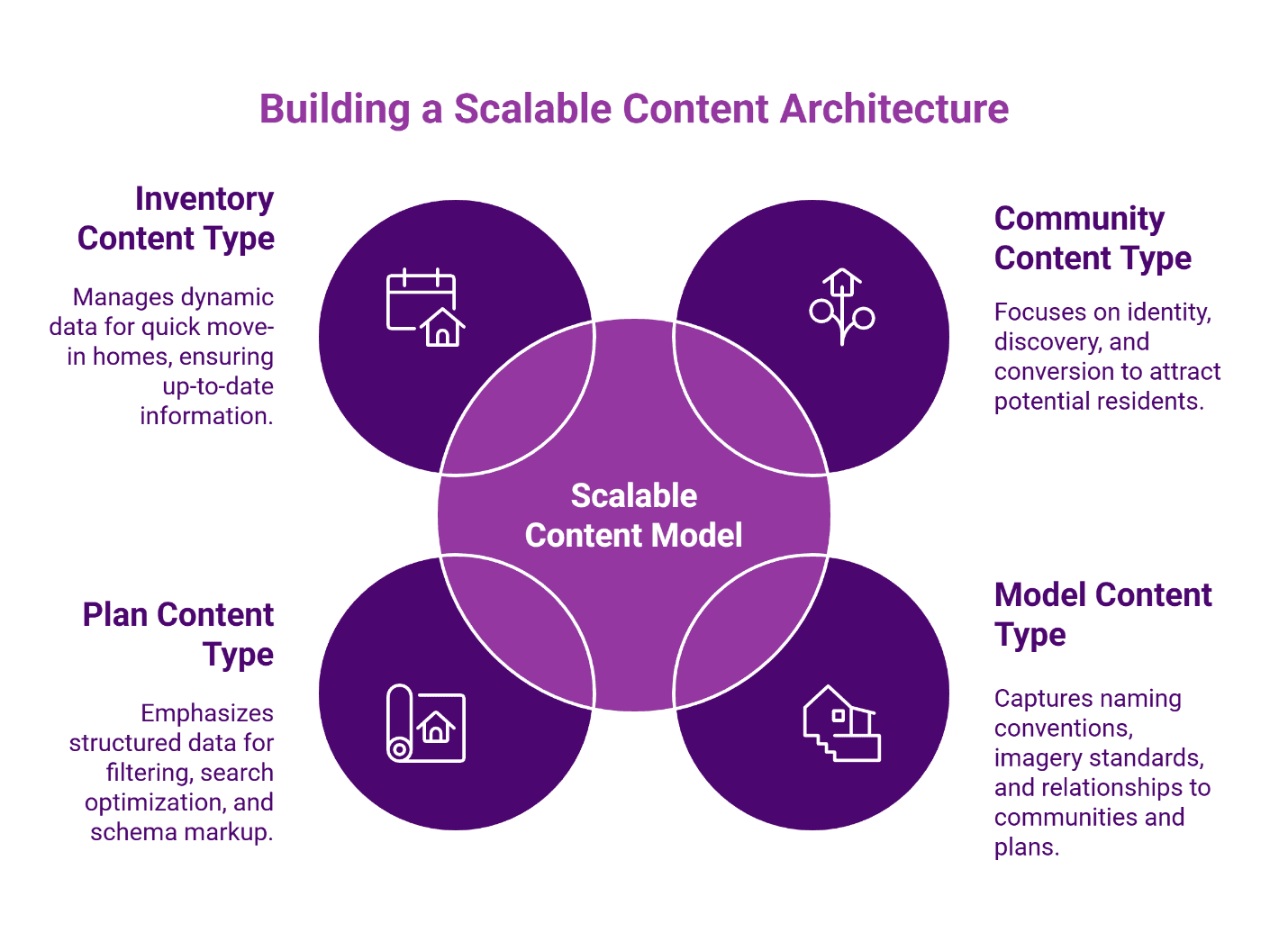
A scalable builder site starts by defining what the CMS is actually managing. The goal is not to publish more pages; it is to publish governed entities that can be reused, linked, validated, and measured. Think of content types the way a site superintendent thinks about spec books. A spec book doesn't describe one house—it defines the rules for building any house in the community. CMS content types work the same way: they define what fields must exist, what relationships connect them, and what validation rules apply.
This entity-first architecture aligns directly with Deep Content Architecture™: define the entities once, define their fields once, and allow pages to assemble consistently.
Community Content Type
A community isn't a page. It's a content type built to answer three jobs: identity, discovery, and conversion.
Identity and positioning establishes what the community is and where it sits. This includes the canonical community name and approved variants, city and optional ZIP fields (used for on-page modifiers and URL logic), overview narrative, amenities list, school information, interactive map embeds, and lifestyle positioning content. These elements answer the "is this right for me?" question that precedes any serious inquiry.
Conversion creates the path to action. The tour CTA must appear consistently above the fold. Contact routes need standardized formatting. Tracking fields—particularly UTM parameters—require governance to ensure attribution survives the click. Without consistent conversion modules, you can't measure which communities drive tours.
Discovery connects the community to the broader site architecture. Internal links to available models and plans should populate automatically based on relationship fields, not manual entry. Links to neighborhood content clusters help capture geo-intent searches without cannibalizing the community page itself.
Model Content Type
Models represent the physical structures available within communities. The content type needs to capture naming conventions (which vary more than you'd expect), hero imagery standards, and differentiating features.
The critical component is relationship fields. A model must declare which communities it's available in, which plans it relates to, and what elevation options exist. These relationships power the internal linking architecture—when a model knows its parent communities, the "See it in [Community Name]" links generate automatically.
Use a naming convention that stays stable across communities. Avoid community-specific suffixes that create duplicates. Treat elevations as structured components where possible so they do not become untracked content fragments.
Plan Content Type
Plans are where structured data becomes non-negotiable. Attributes like bedrooms, bathrooms, square footage, levels, and garage bays must exist as discrete fields, not prose buried in body copy. These fields serve multiple purposes: they enable filtering functionality, support long-tail search optimization, and provide the raw material for schema markup.
Relationship fields matter here too. A plan should declare which communities offer it, which model variants it appears in, and—if your inventory model supports it—which quick move-in homes feature this plan. Normalize plan naming to prevent drift, including consistent handling of "Plan A / The Aspen / Aspen II" variants.
Optional: Inventory and Quick Move-In as a Separate Type
Inventory should be a separate content type only when the data is dynamic and operationally maintained—for example, when homes sell and new inventory appears weekly. A dedicated content type with automated data feeds makes sense in that scenario. If inventory updates quarterly, treating it as a module that pulls from an external source may suffice.
The key principle: don't let implementation complexity distract from the core architecture. Communities, models, and plans are the foundation. Inventory is an enhancement.
Template Modules: Reusable Blocks Built Like Trades
A site superintendent doesn't rebuild the electrical system for every home. Electricians work from standard specifications, adapted as needed for each floor plan. Template modules follow the same logic: define them once, deploy them everywhere, customize only where the content type requires it.
The Tour-Ready Module Set
The goal is not identical pages; the goal is identical critical paths.
Conversion consistency starts above the fold. The primary CTA—whether "Book a Tour," "Schedule a Visit," or your preferred variant—must appear in the same position, with the same styling, across every community, model, and plan page. Variation here isn't creativity; it's friction.
Contact routes need the same treatment. Phone numbers, form links, and chat widgets should follow standardized placement rules. More importantly, UTM parameters need governance. When every page appends tracking data differently, attribution analysis becomes guesswork.
Proof modules present a trickier challenge. Reviews and testimonials build trust, but not every community has them. The template should accommodate proof content where it exists without leaving awkward gaps where it doesn't. Conditional display logic—show if present, hide if absent—solves this cleanly.
Media galleries deserve dedicated attention. Images and video tours drive engagement, but inconsistent alt text and caption formatting undermine accessibility and search visibility. The template should enforce captioning standards and alt text requirements at the field level.
The Internal Linking Module Set
Internal links shouldn't require manual construction. When relationship fields are properly defined, internal linking modules can generate automatically.
The community-to-model-to-plan flow represents the primary navigation path. A community page should display "Available Models" with links that pull from the relationship field. A model page should display "Available Plans" the same way. And plan pages should reverse the flow: "See This Plan in [Community Name]" links route users back up the hierarchy.
Anchor text conventions prevent drift. If one page links to "Riverstone Community" and another links to "The Riverstone," you've introduced inconsistency that confuses both users and search engines. The template should pull anchor text from canonical name fields, not freeform entry.
Neighborhood content clusters present a special case. Content targeting "[City] new homes" or "[ZIP] luxury builders" shouldn't compete with community pages for the same terms. Instead, neighborhood content should route users to the nearest relevant community—a pattern the Deep Content Architecture™ framework handles through entity-based content modeling.
Field Governance: The Spec Book That Prevents Content Drift
Templates provide structure. Field governance provides discipline. Without both, content drift is inevitable—and content drift kills scalability.
Required Versus Optional Fields
Every content type needs a clear distinction between "stop-ship" fields and "nice-to-have" fields. Stop-ship fields are non-negotiable: if the field is empty, the page cannot publish. Nice-to-have fields enhance the page but don't block deployment.
For communities, stop-ship fields typically include: community name (canonical), city, primary tour CTA URL, and at least one related model. For models: model name, model slug, and at least one related community. For plans: plan name, bedroom count, bathroom count, square footage, and tour CTA label.
The validation layer matters as much as the requirement. A "required" field that accepts any input isn't actually enforcing quality. Validation rules should check format (is the ZIP actually a valid ZIP?), completeness (does the tour CTA URL include proper UTM parameters?), and relationship integrity (does the related community actually exist in the system?).
Naming Conventions and Canonical Rules
Plan naming generates more inconsistency than almost any other field. Is it "The Ashford" or "Ashford"? "Plan 2450" or "2450 Plan"? "3BR/2BA" or "3 Bed / 2 Bath"?
Normalization rules should exist before the first page publishes. Define the canonical format, document it, and enforce it at the field level. When legacy content uses variant naming, create redirects to the canonical version rather than maintaining duplicates.
De-duplication matters for models too. If the same model appears in multiple communities, it should exist as a single content item with multiple relationship assignments—not as separate pages that inevitably diverge over time.
The QA Checklist: SEO Inspections
Before any page goes live, it should pass an inspection checklist. This isn't bureaucracy; it's quality control applied to digital assets the same way you'd apply it to physical construction.
Template integrity checks verify that required modules appear in expected positions. Is the tour CTA above the fold? Do internal links populate correctly from relationship fields? Does the media gallery follow captioning standards?
Schema validation checks confirm that structured data matches visible content. Google's Rich Results Test provides automated validation, but the deeper check is semantic: does the schema accurately describe what the page contains?[^2] Schema that doesn't match visible content risks manual action.[^3]
Link integrity checks catch broken internal links before they frustrate users. Automated crawling tools flag 404s, but governance-level checks should verify that relationship-based links resolve correctly when content types reference each other.
Indexation readiness checks matter for scheduled launches. If a community page needs to go live on a specific date, the template should support publication scheduling without requiring manual intervention on launch day.
The Perfect Page Blueprint™ provides a detailed framework for these inspection-ready templates.
Schema Blocks: Machine-Readable by Default
Schema markup shouldn't be an afterthought bolted onto finished pages. When schema lives in reusable blocks tied to content types, every page launches with validated structured data—no manual implementation required.
What Schema Blocks Mean in a CMS Context
Traditional schema implementation treats markup as a page-level concern: someone writes JSON-LD, pastes it into the template, and hopes nothing changes. Schema blocks flip this approach. The block defines the schema structure; the content type provides the field values; the template renders both automatically.
This matters because schema must match visible content. When a plan page displays "4 bedrooms" but the schema says "3 bedrooms," you have a mismatch that could trigger manual action.[^3] Schema blocks that pull directly from the same fields as visible content eliminate this risk by design.
Where Schema Belongs
Community templates benefit from LocalBusiness or Place-style markup, though implementation varies significantly based on site architecture and business model. The key fields—name, address, geographic coordinates—should map directly from community content type fields. Avoid overly aggressive markup that implies capabilities or relationships that don't exist.
Model and plan templates present trickier decisions. Product-like semantics can work where appropriate, but "appropriate" depends heavily on how the builder sells. Spec homes with fixed pricing fit the Product pattern more naturally than custom builds with variable pricing. When in doubt, simpler markup that accurately describes the page beats aggressive markup that might mislead.
One critical caveat: schema eligibility for rich results does not guarantee rich results. Google displays enhanced features based on many factors beyond valid markup. Implementing schema blocks increases machine interpretability and eligibility, but making promises about rich result appearance would be misleading.
Validation Workflow
Schema validation needs two layers: automated testing and human review.
Google's Rich Results Test catches syntax errors and structural problems.[^2] Run every template through this test before deployment, and run it again whenever schema blocks change. Automated testing belongs in the QA checklist discussed earlier.
Human review catches semantic problems that automated tools miss. Does the schema accurately describe what the page contains? Does the markup make claims the visible content doesn't support? These questions require judgment, not just validation scripts.
If you include schema mappings in your implementation, ensure that markup matches visible page content exactly. Discrepancies between structured data and on-page content create compliance risks.
A Schedule-Aware Launch Workflow
Templates and governance enable something previously difficult: launching new community content on a predictable schedule. When the infrastructure exists, adding communities becomes a matter of populating fields and triggering publication—not rebuilding pages from scratch.
Week 1: Content model and field definitions. Define the content types, specify required fields, establish validation rules, and document naming conventions. This is architectural work that happens once and benefits every subsequent launch.
Week 2: Templates and module development. Build the reusable modules, implement schema blocks, and create the templates that assemble modules into page types. Test thoroughly with sample content before moving forward.
Week 3: Governance and QA implementation. Establish the inspection checklist, train content creators on field requirements, and run pilot content through the full workflow. Identify gaps before they become launch-day problems.
Week 4 and beyond: Scale rollout per community release cadence. With infrastructure in place, launching a new community becomes a content population exercise. Marketing creates the content, the system validates it against governance rules, QA runs the inspection checklist, and publication happens on schedule.
The tour-first measurement framework ties everything together. When templates enforce consistent UTM parameters and attribution tracking, you can finally answer the question that matters: which communities generate booked tours? The 30-Day Roadmap outlines how this measurement layer integrates with content architecture.
Common Implementation Mistakes and How to Avoid Them
Even well-designed systems fail when implementation introduces errors. These patterns appear frequently enough to warrant explicit warning.
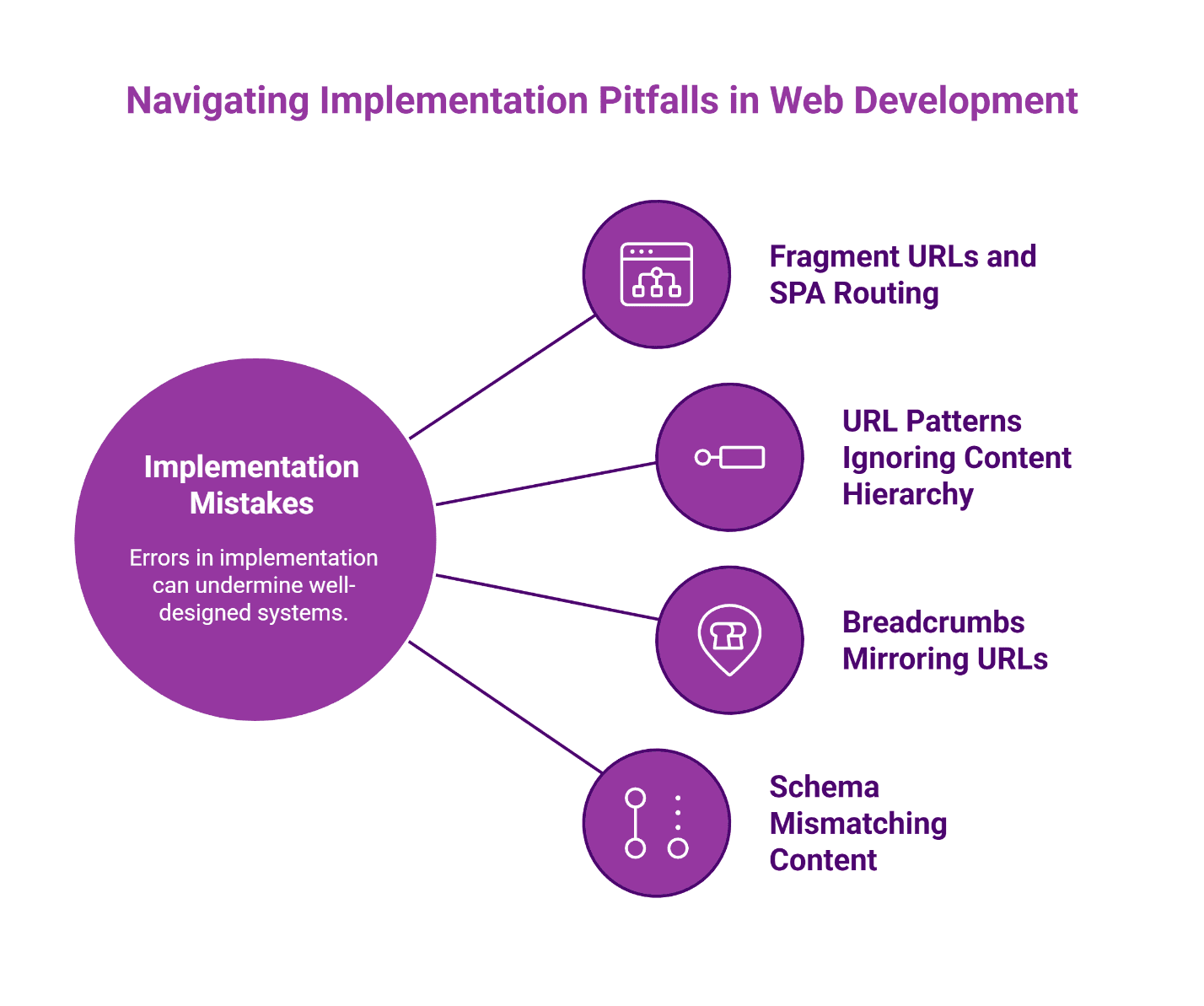
Fragment URLs and SPA routing mistakes break crawlability. Single-page applications that use hash fragments (#) for navigation create pages that search engines may not index properly. The History API provides a solution: URLs change without fragments, and search engines can crawl each state.[^4] If your CMS or framework relies on fragment-based routing, address this before launch.
URL patterns that ignore content hierarchy confuse both users and search engines. When community pages live at /communities/riverstone/ but model pages live at /models/the-ashford/ with no hierarchical connection, you've broken the logical relationship between content types. URL structure should reflect content relationships: /communities/riverstone/models/the-ashford/ makes the hierarchy explicit. Because models appear in multiple communities, ensure proper canonical tagging points to a primary version to prevent duplicate content issues.[^5]
Breadcrumbs that mirror URLs instead of user paths miss the point. Breadcrumb structured data helps users understand where they are in a site hierarchy. If breadcrumbs mechanically reproduce URL segments rather than representing meaningful navigation paths, they provide less value than thoughtfully designed alternatives.[^6] Governance should specify how breadcrumbs render for each content type.
Schema that doesn't match visible content creates the most serious risk. When structured data makes claims the page doesn't support—prices that don't appear, features that don't exist, availability that isn't accurate—you risk manual action from Google.[^3] The schema block approach mitigates this by pulling values from the same fields that populate visible content, but human QA review remains essential.
Template Field Dictionary
Use this field dictionary to align marketing, sales, and web teams on exactly what must be captured for each community, model, and plan—then implement once and scale everywhere.
| Content Type | Field Key | Field Label | Type | Required | Validation | SEO Usage | Schema Mapping | Notes |
|---|---|---|---|---|---|---|---|---|
| Community | community_name | Community Name | text | required | non-empty | H1 + title variants | name | Canonical community name |
| Community | community_city | City | text | required | non-empty | on-page + URL logic | addressLocality | Use [City] format |
| Community | community_zip | ZIP | text | optional | valid ZIP format | local modifiers | postalCode | Use when applicable |
| Community | community_overview | Community Overview | rich_text | required | non-empty | primary body copy | description | Keep length consistent |
| Community | primary_tour_cta_url | Tour CTA URL | url | required | https | conversion | potentialAction.target | Include UTM policy |
| Community | amenities | Amenities | list | optional | >=0 items | on-page scannability | amenityFeature | Only list amenities shown |
| Community | schools_nearby | Schools Nearby | list | optional | >=0 items | local relevance cues | areaServed | Implementation varies |
| Community | map_location | Map Location | object | optional | valid lat/long | UX + trust cues | geo | Only if displayed |
| Community | models_related | Available Models | relationship | required | >=1 | internal links module | isRelatedTo | Model content references |
| Model | model_name | Model Name | text | required | non-empty | H1/H2 | name | Consistent naming |
| Model | model_slug | Model Slug | text | required | kebab-case | URL structure | url | Stable across communities |
| Model | model_hero_media | Hero Media | media | required | valid asset | visual SERP/UX cues | image | Alt text rules applied |
| Model | communities_available_in | Available In | relationship | required | >=1 | internal link destinations | isRelatedTo | Link to community pages |
| Model | plans_related | Related Plans | relationship | optional | >=0 | routing to plan pages | isRelatedTo | Only if mapping exists |
| Plan | plan_name | Plan Name | text | required | non-empty | H1 + SERP naming | name | Normalize variants |
| Plan | beds | Bedrooms | number | required | >=0 | long-tail queries | numberOfRooms | Map carefully if used |
| Plan | baths | Bathrooms | number | required | >=0 | long-tail queries | numberOfBathroomsTotal | Visible content must match |
| Plan | sqft | Square Footage | number | required | >=1 | plan SEO | floorSize | Keep consistent units |
| Plan | levels | Levels | number | optional | >=0 | attribute scannability | — | Only if shown |
| Plan | garage | Garage | number | optional | >=0 | attribute scannability | — | Only if shown |
| Plan | options_highlights | Options Highlights | rich_text | optional | non-empty | differentiators | — | Avoid duplicating |
| Plan | tour_cta_label | CTA Label | text | required | non-empty | conversion | — | Book a Tour default |
| Plan | primary_tour_cta_url | Tour CTA URL | url | required | https | conversion tracking | potentialAction.target | Inherit from community |
| Plan | communities_available_in | Available In | relationship | required | >=1 | internal links module | isRelatedTo | Route back to community |
| Inventory | inventory_status | Inventory Status | select | optional | {available;pending;sold} | filter UX | availability (mapped to ItemAvailability) | Requires mapping status values to schema.org URLs (e.g., InStock) |
| Inventory | offer | Offer | object | optional | valid object | availability semantics | Offer | See schema.org/Offer |
Resources
Ship on Schedule, Measure What Matters
Remember that scrambling marketing team from the opening? Three communities, four models each, 72 pages built by hand? With governed content types, that same launch looks different.
The content model exists. Templates are tested. Field governance catches errors before publication. Schema blocks validate automatically. Internal links generate from relationship fields. Attribution tracking stays consistent because UTM parameters follow documented standards.
The family searching "new homes near [ZIP]" lands on the right community page. They see available models. They click through to a plan that matches their needs. They book a tour.
That's the outcome that matters—not pages published, but tours booked. CMS templating makes it repeatable.
When you're ready to implement this framework for your builder site, schedule a strategy session to discuss your specific community launch calendar and content architecture needs.
Disclaimer: This guide provides general frameworks for CMS architecture and structured data implementation. Schema markup eligibility for rich results does not guarantee display of enhanced search features. Implementation requirements vary based on CMS platform, technical infrastructure, and specific business needs. Consult with qualified technical professionals before making significant changes to site architecture.
Our Editorial Process: Our expert team uses AI tools to help organize and structure our initial drafts. Every piece is then extensively rewritten, fact-checked, and enriched with first-hand insights and experiences by expert humans on our Insights Team to ensure accuracy and clarity.
About the Brazos Valley Marketing Insights Team: The Brazos Valley Marketing Insights Team is our dedicated engine for synthesizing complex topics into clear, helpful guides. While our content is thoroughly reviewed for clarity and accuracy, it is for informational purposes and should not replace professional advice.
References
[^1]: Google Search Central provides guidance on structured data policies and potential manual actions at https://developers.google.com/search/docs/appearance/structured-data/sd-policies
[^2]: The Rich Results Test validates structured data implementation: https://search.google.com/test/rich-results
[^3]: Google's structured data guidelines emphasize that markup must accurately reflect page content: https://developers.google.com/search/docs/appearance/structured-data/sd-policies
[^4]: JavaScript SEO best practices, including History API usage for crawlable URLs: https://developers.google.com/search/docs/crawling-indexing/javascript/javascript-seo-basics
[^5]: URL structure best practices from Google Search Central: https://developers.google.com/search/docs/crawling-indexing/url-structure
[^6]: Breadcrumb structured data guidelines: https://developers.google.com/search/docs/appearance/structured-data/breadcrumb

About the Author
Dustin Ogle
Dustin Ogle is the Founder and Head of Strategy at Brazos Valley Marketing. With over 9 years of experience as an SEO agency founder, he specializes in developing the advanced AI-driven strategies required to succeed in the new era of search.