Broker & Realtor Co-op Enablement: SEO Assets That Drive Qualified Co-op Traffic
Last Updated: December 30, 2025 • 12 min read
📌 Key Takeaways
Governed enablement assets route partner traffic to the correct community pages and prove tour attribution—without governance, co-op visibility leaks potential buyers.
- Single Source of Truth Prevents Chaos: An eight-part enablement pack—hub page, one-sheets, approved copy, UTM kit—ensures every partner works from current, accurate assets.
- UTMs Track Clicks, Not Dials: Dynamic number insertion links calls to UTMs only when users click first; direct dialers require unique static numbers per partner for attribution.
- Internal Link Equity Over Backlink Hopes: Partner hub pages distribute authority to community pages rather than earning external backlinks from realtor sites.
- Consistency Strengthens Entity Signals: Standardized naming across MLS, social, and email prevents the dilution of local authority that occurs when search engines encounter conflicting data.
- Measure Tours, Not Traffic: Weekly leading indicators (hub clicks, CTA engagement) predict demand; monthly lagging indicators (booked tours, show rate) prove co-op ROI.
Control the assets, control the attribution, close more tours.
Marketing managers at regional and luxury homebuilders will gain a repeatable framework for partner governance here, preparing them for the implementation checklist that follows.
The partner email goes out Monday. By Wednesday, three realtors have posted your community on social media—each with different pricing, outdated renderings, and links pointing to your corporate homepage instead of the model center page. The phone rings. The lead can't find the community. The tour never gets booked.
This is what happens when co-op marketing runs without governance. Broker and realtor partners can multiply qualified demand for your communities—but only when you control three things: the assets they use, the landing paths shoppers follow, and the attribution that proves a tour actually happened.
That control starts with a governed, linkable enablement pack that routes every shopper to the correct community page and captures measurable actions. Think of it like coordinating trades on a job site: content, technical SEO, and local visibility all need to deliver on schedule, inspected against the same specs.
Why Co-op Traffic Fails for Builders
A qualified co-op visit is a shopper who lands on the correct community page, takes a measurable action (form fill, call, direction request), and proceeds into a tour-first conversion path—tour booked, appointment scheduled, or a tracked call that can be dispositioned in CRM. Everything else is visibility without proof.
Many co-op programs frequently struggle at one or more of these checkpoints:
- Wrong landing page. Partners link to the homepage, a stale inventory page, or a third-party listing that cannot convert to tours.
- Outdated copy. MLS descriptions reference sold-out floor plans or last year's incentives.
- Inconsistent naming. The community appears as "Riverside Estates" in one listing and "The Estates at Riverside" in another—confusing both shoppers and search engines.
- Broken tracking. UTM parameters are missing, malformed, or never connected to CRM statuses.
- Generic CTAs. "Contact us" instead of "Book a tour at [Community]."
Each failure mode bleeds potential tours. The fix isn't more content—it's a single source of truth that every partner pulls from.
The 8-Part Broker & Realtor Enablement Pack
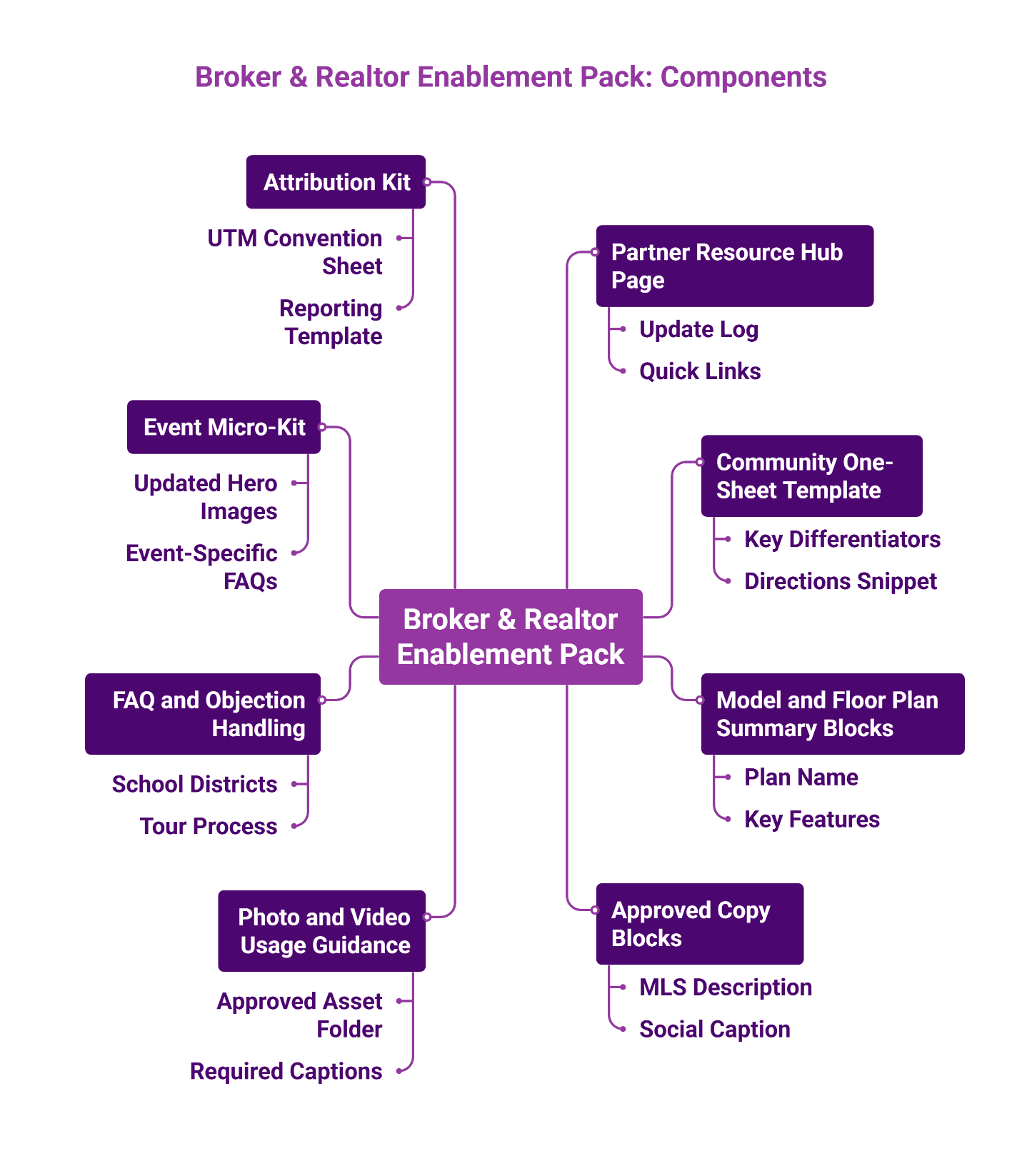
A tour-driven SEO program treats partner enablement like a spec book: every asset documented, every update logged, every link governed. The following eight components form a complete enablement pack that partners can use immediately while marketing stays in control.
1. Partner Resource Hub Page
A dedicated, linkable page on your site where partners find everything—community one-sheets, approved copy, UTM links, event kits. Include an update log so partners know when assets changed. This page consolidates assets to ensure downstream consistency; while primarily for partner utility, it also serves as an internal hub to distribute link equity to your community pages.
Template modules:
- Hero: "Tour-ready links for [Community] homes in [City], [ZIP]"
- Quick links: Tour CTA, directions, model highlights, event module (if applicable)
- Community index: One card per community with canonical URL and partner link
- Update log: Date, what changed, owner, next review date
- Partner FAQ: "Where to link," "What not to claim," "How to report leads"
2. Community One-Sheet Template
A single-page PDF or web module covering amenities, model center hours, driving directions, and two or three key differentiators. Keep it scannable—designed so partners can easily forward it to buyers.
Fields: Community name (official), address/meeting point, tour hours, key differentiators, directions snippet, what to say and what to avoid, canonical community URL.
3. Model and Floor Plan Summary Blocks
Attribute-rich descriptions using consistent naming conventions (square footage, bed/bath count, base price range if permitted). Standardized naming strengthens your local entity signal, preventing the dilution of authority that occurs when search engines encounter conflicting data.
Fields: Plan name (official), beds/baths/range, key features, "best for" scenarios, canonical plan URL if available, "book a tour" link.
4. Approved Copy Blocks
Pre-written variants for MLS listings, social captions, and email introductions. Each block links back to the correct community page. Partners copy, paste, and publish without inventing language that drifts off-message.
Provide three blocks:
- MLS description variant (compliance-safe, factual)
- Short social caption (one sentence plus link)
- Longer email copy (scannable, tour-first CTA)
5. Photo and Video Usage Guidance
Specify which images are approved, how to caption them, and where captions should link. Outdated renderings or interior shots from a different floor plan erode buyer trust.
Guidance elements:
- Approved asset folder
- Required captions (what to call the community and models)
- Required destination links (hub to community page)
- Prohibited edits and prohibited claims
6. FAQ and Objection Handling
This is not sales scripting. It is operational clarity: what a shopper can expect when arriving and what a partner can safely say.
Address the questions partners hear most: school districts, commute times, HOA basics (where permissible), tour process, and what to expect at a design-center appointment. Partners equipped with accurate answers close more tours.
7. Event Micro-Kit
For Parade of Homes weekends or grand openings, provide a refresh bundle: updated hero images, event-specific FAQs, and a temporary CTA ("Tour this weekend—no appointment needed"). Define what changes and what stays governed (URLs, UTM conventions, community naming).
8. Attribution Kit
A UTM convention sheet plus a "what to report back" template. Partners generate trackable links; you receive a weekly summary of clicks, form fills, and booked tours tied to each partner.
"Broker partners amplify demand; your assets control the message."
For a deeper look at connecting visibility to booked appointments, see Sales–Marketing Alignment for Tours.
Comparative Matrix: Which Assets Drive Which Outcomes
Not every asset serves the same purpose. The matrix below maps each enablement component to four outcomes—authority building, accuracy, conversion, and measurability—along with common pitfalls.
| Asset | Best For | Pros | Cons | Common Mistake | How to Measure |
|---|---|---|---|---|---|
| Partner Hub Page | Authority, links | Centralizes updates; earns backlinks | Requires maintenance | Letting it go stale | Referral traffic, backlink count |
| Community One-Sheet | Accuracy, conversion | Easy to share; keeps messaging consistent | Static format | No update date shown | Partner adoption rate |
| Model Summary Blocks | Accuracy | SEO-safe naming; attribute-rich | Needs inventory sync | Inconsistent naming across platforms | Crawl errors, duplicate listings |
| Approved Copy Blocks | Accuracy, conversion | Prevents drift; speeds partner posting | May feel restrictive | No MLS-length variant | Copy compliance audits |
| Visual Usage Guidance | Accuracy | Protects brand integrity | Partners may ignore | Outdated hero image circulating | Reverse image search audits |
| FAQ & Objection Handling | Conversion | Equips partners; reduces friction | Needs legal review for HOA topics | Missing design-center expectations | Partner feedback, tour show rate |
| Event Micro-Kit | Conversion, visibility | Timely relevance; boosts event traffic | Short shelf life | Forgetting to revert after event | Event-period traffic lift |
| Attribution Kit | Measurability | Proves ROI; identifies top partners | Requires partner compliance | No CRM handoff | UTM-attributed tours |
If your priority is proving co-op ROI, start with the Attribution Kit and Partner Hub Page. If accuracy is the bigger problem, prioritize Approved Copy Blocks and Model Summary governance.
Building the Partner Hub Page
The hub page is the single source of truth partners bookmark. Structure it so they find what they need in seconds.
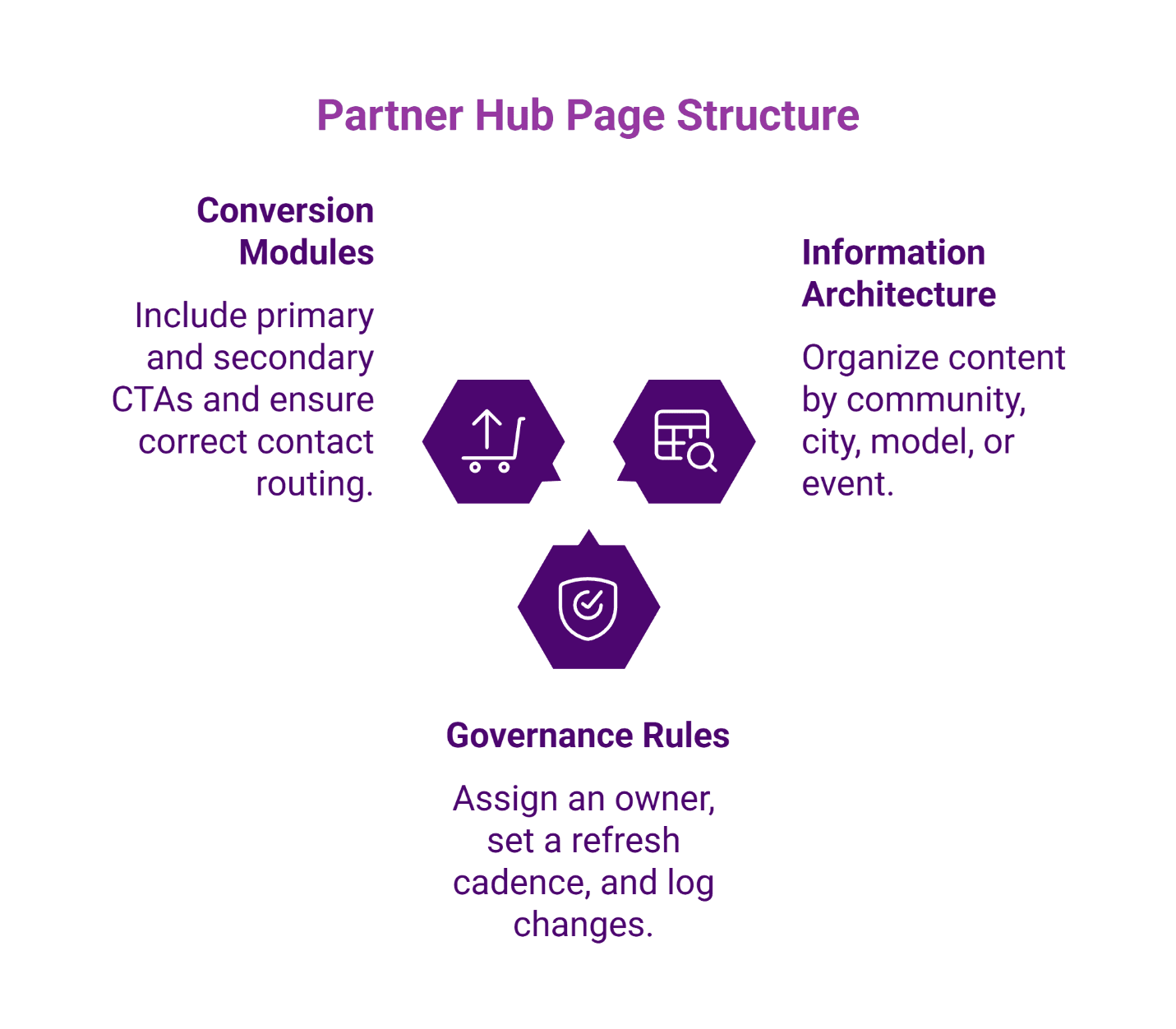
Information architecture options:
- By community (most common for regional builders)
- By city or ZIP intent clusters
- By model or floor plan family (only if canonical plan pages exist)
- By event (temporary section for launches or parades)
Governance rules:
- Assign a single owner responsible for updates.
- Set a refresh cadence—monthly at minimum, plus triggered updates when inventory shifts, a launch date approaches, or an event ends.
- Log every change with a visible date stamp.
Conversion modules:
- Primary CTA: "Book a tour at [Community]"
- Secondary CTA: "Schedule a design-center appointment"
- Contact routing: Ensure form submissions and calls route to the correct sales team, not a generic inbox.
For related guidance on structuring geo-intent pages without cannibalizing brand terms, see Neighborhood Content Clusters.
UTM Governance for Co-op Partners
UTMs work only when they are governed end-to-end: created consistently, preserved through the click, and captured into downstream records. If you cannot measure partner-driven tours, you cannot prove co-op value.
Naming conventions:
- utm_source: Partner name or partner category (e.g., "smith_realty" or "broker_network")
- utm_medium: "referral," "partner," or channel type (email, social) if splitting channels
- utm_campaign: Community name or event (e.g., "riverside_estates" or "spring_parade")
- utm_content: Asset type or variant identifier (e.g., "mls," "email_v1," or "social_post")
Provide partners with a link generator or pre-built URLs. Require them to use your links rather than inventing their own. Google's campaign URL builder guidance provides a practical baseline.
Partner-specific vs. shared links:
Partner-specific links identify individual agents and are appropriate when performance needs to be attributed to a specific partner. Shared links work for broker offices distributing a single URL across their team when only aggregate performance is needed. Choose based on how granularly you need to attribute performance.
ROBO bridge (Research Online, Buy Offline):
Capture the UTM at form fill or call tracking. Pass it into your CRM as a lead source field. When the tour is booked, the CRM status updates. When the sale closes, attribution traces back to the originating partner.
For a full breakdown of tour-first KPIs, see Tracking What Matters in Local SEO.
Compliance and Trust Guardrails
Partner-distributed content carries your brand. Two compliance areas require attention. This section is informational only; legal counsel should review high-risk scenarios.
Fair Housing considerations:
Digital advertising—including partner posts—must comply with Fair Housing Act requirements. Avoid language or targeting that could be interpreted as steering or discrimination. HUD guidance clarifies that these obligations extend to online platforms.
Truth-in-advertising for testimonials:
If partners share buyer testimonials or endorsement-style content, the FTC requires that claims reflect typical results and that material connections are disclosed. FTC guidance on endorsements and reviews covers these requirements. Provide partners with compliant testimonial templates rather than letting them improvise.
The goal is accuracy without over-restriction. Give partners enough latitude to personalize while keeping copy within governed rails.
Event-Aligned Refresh: The 14-Day Co-op Sprint
Launches and showcase weekends create demand spikes. A short sprint ensures partner assets capture that surge without breaking long-term governance.
What to refresh (7–14 days before the event):
- Google Business Profile posts with event details
- Hub page hero module featuring the event
- Event-specific FAQ answers
- Partner email templates with event CTA
What must stay governed:
- Canonical community URLs (no temporary vanity URLs)
- UTM naming conventions
- Official community naming
After the event, revert hero modules and remove event-specific language. Log the changes on the hub page so partners know the sprint ended.
What to Measure Weekly vs. Monthly
Tours-first measurement means leading indicators predict demand while lagging indicators prove outcomes.
Weekly (leading):
- Partner hub page sessions and clicks
- CTA click-through rate by community
- Direction requests from local listings (where applicable)
Monthly (lagging):
- Booked tours attributed to partner sources
- Design-center appointments from partner traffic
- Show rate (booked vs. attended)
- Sales-qualified tours
"Visibility is potential; booked tours are the proof."
This KPI ladder aligns with Tour-First Local SEO principles—measuring what matters rather than chasing vanity traffic.
Implementation Checklist
Roll out the enablement pack like a construction schedule: phased, inspected, documented.
- Select a pilot community. Choose one with active partner relationships and enough traffic to validate measurement.
- Build the partner hub page. Publish with all eight asset types, even if some are placeholder templates initially.
- Issue the enablement kit. Email partners the hub link, walk through the UTM convention sheet, and answer questions.
- Verify links. Audit partner posts within the first week—confirm correct URLs, accurate copy, functional UTMs.
- Start reporting cadence. Send partners a weekly snapshot of their attributed clicks and tours. Transparency builds adoption.
For broader context on local visibility strategies for model centers, see Map Pack Mastery for Model Centers and Local SEO for Luxury Home Communities.
Frequently Asked Questions
Disclaimer: This article is for informational purposes only and does not constitute legal advice. For Fair Housing or advertising compliance questions, consult qualified legal counsel.
Our Editorial Process: Our expert team uses AI tools to help organize and structure our initial drafts. Every piece is then extensively rewritten, fact-checked, and enriched with first-hand insights and experiences by expert humans on our Insights Team to ensure accuracy and clarity.
About the Brazos Valley Marketing Insights Team: The Brazos Valley Marketing Insights Team is our dedicated engine for synthesizing complex topics into clear, helpful guides. While our content is thoroughly reviewed for clarity and accuracy, it is for informational purposes and should not replace professional advice.

About the Author
Dustin Ogle
Dustin Ogle is the Founder and Head of Strategy at Brazos Valley Marketing. With over 9 years of experience as an SEO agency founder, he specializes in developing the advanced AI-driven strategies required to succeed in the new era of search.